
You've finished the manuscript, checked the spelling, and exported the file. The first conversion looks promising until you open it on a phone. A chapter begins halfway down the screen, the table of contents leads nowhere, an image is wider than the display, and the retailer flags the file before readers ever see it.
That result doesn't mean your book is bad. It means a word-processing document and an ebook solve different problems. A manuscript describes words on pages, while an ebook must adapt those words to phones, tablets, dedicated ereaders, desktop apps, and screen readers.
Professional ebook formatting handles more than fonts and chapter spacing. It builds the file's structure, navigation, metadata, images, language information, accessibility features, and retailer-ready package. You can review the practical preparation stage in these manuscript formatting guidelines, then use the pipeline below to understand what happens after the writing is finished.
Why Your Finished Manuscript Is Not an Ebook Yet
A first-time author often treats conversion as the final click: upload a Word document, accept the converter's defaults, and download an EPUB or Kindle file. That approach may produce a file that opens, but opening isn't the same as working correctly.
A novel might show body text with inconsistent indents because the converter interpreted manual spaces as layout instructions. A nonfiction book may lose the relationship between a figure and its caption. A chapter title may look correct but fail to appear in the table of contents because it wasn't marked as a real heading. Footnotes can become stranded, internal links can point to the wrong location, and an image can become unreadable when the screen narrows.
The underlying issue is simple: print-oriented formatting assumes a stable page, while ebook formatting assumes a changing reading environment. Readers can enlarge text, change fonts, rotate a screen, adjust margins, or use assistive technology. Your file must respond without losing its reading order or meaning.
What the production work includes
A professional formatter turns the manuscript into a structured publication with:
- Adaptable layout: Text reflows instead of depending on fixed page dimensions.
- Semantic structure: Headings, paragraphs, lists, figures, captions, notes, and links have identifiable roles.
- Navigation: The table of contents and internal links take readers to the intended destination.
- Resource management: Images, stylesheets, fonts, and content files are packaged and referenced correctly.
- Accessibility support: Language information, image descriptions, logical reading order, and meaningful headings help more readers use the book.
- Retail compliance: The finished package follows current EPUB and platform requirements rather than relying on obsolete conventions.
A rushed conversion hides errors until the book reaches a device or retailer. Professional formatting finds those errors while the production team can still correct them.
What Professional Ebook Formatting Actually Involves
Think of an EPUB as a shipping container, not a single sheet of paper. The container holds the book's content and the instructions reading systems need to unpack and present it.
The three parts that keep the package organized
The first part is the manifest. It lists the resources inside the publication, including XHTML content files, stylesheets, images, fonts, and navigation files. If a chapter exists in the folder but isn't declared in the manifest, the reading system may not know that it belongs in the book.
The second part is the spine. It sets the reading order. A wrong spine entry can place an appendix before the final chapter, skip a section, or make a note appear before the passage that refers to it.
The third part is the navigation document. It powers the table of contents and gives readers a reliable way to move through the book. A visible list of chapter names isn't enough if the entries don't link to the correct destinations.
EPUBCheck documentation describes structural errors such as a manifest item pointing to a file that can't be found. Apple Books also requires submitted EPUB files to pass the most recent EPUBCheck version. That makes validation a production gate, not a decorative technical step.
Why visual polish depends on structure
Suppose a stylesheet contains the rule that gives chapter headings their appearance. If that stylesheet is missing from the manifest or declared with the wrong media type, the chapter may open with default styling. The text is still present, but the hierarchy disappears.
The same cause-and-effect applies to images. A cover, figure, or illustration needs a valid file reference, a correct location in the content, suitable dimensions, and an appropriate description when it carries meaning. A production-ready package connects all those pieces instead of treating them as separate decoration.
Practical rule: Validate after every conversion, fix errors rather than hiding them, and inspect the result in an actual reading application.
Tools can help, but the right tool depends on the book and the author's tolerance for technical work. A useful overview of book formatting software can help you compare a guided application with a specialist workflow. Neither option removes the need to inspect the output.
Reflowable Versus Fixed Layout
The most consequential formatting decision comes before styling. You need to choose whether your book should behave like adaptable text or like a designed page.
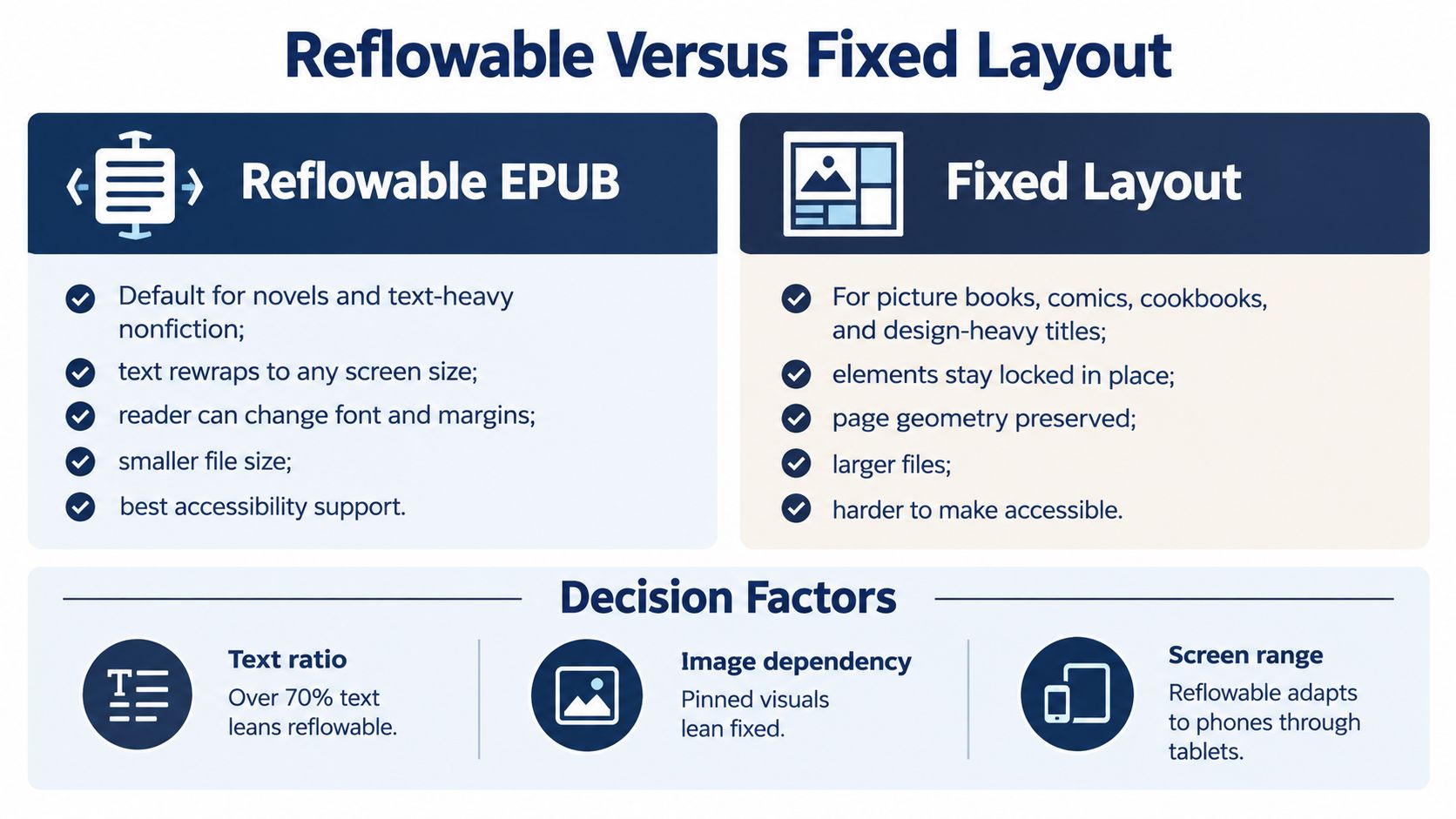
A reflowable EPUB lets text adjust to the reader's screen, font choice, text size, and margins. That makes it the usual choice for novels, memoirs, essays, and text-heavy nonfiction. A reader can enlarge the type on a phone without forcing every line to remain in the position it occupied on your computer.
A fixed-layout EPUB preserves the relationship between elements on the page. It suits picture books, comics, illustrated titles, and design-heavy cookbooks where moving an image or caption would change the meaning of the composition. The IDPF released an EPUB fixed-layout format in 2012, extending the standard for books whose visual arrangement is essential, as described in the EPUB 3 specification history.
Match the format to the reading experience
A romance novel with paragraphs, dialogue, and chapter breaks usually belongs in a reflowable format. A children's picture book where the sentence must sit beside a specific illustration may require fixed layout. A cookbook can fall between the two: if readers need flexible instructions with occasional images, reflowable may work; if each recipe depends on a carefully composed spread, fixed layout may be more appropriate.
| Book type | Best format | Why |
|---|---|---|
| Novel or memoir | Reflowable EPUB | Text remains adaptable across screen sizes and reader settings |
| Text-heavy nonfiction | Reflowable EPUB | Headings, notes, lists, and paragraphs can rewrap naturally |
| Picture book | Fixed layout | Illustrations and text need to maintain their designed relationship |
| Comic or graphic title | Fixed layout | Panels, lettering, and artwork depend on page geometry |
| Image-led cookbook | Depends on design | Reflowable supports flexible instructions, while fixed layout preserves composed pages |
Why the wrong choice creates expensive rework
No amount of font adjustment can make a reflowable file preserve a complex illustration spread. Conversely, forcing a conventional novel into fixed pages can make reading awkward, limit text resizing, and create unnecessary accessibility barriers.
You may also hear authors discuss EPUB and MOBI as if they're equal choices for every retailer. The practical question is not which file extension sounds familiar. It's which current format and retailer-specific package your distribution plan requires. Build from the reading experience and platform requirements first, then generate the necessary delivery files from a clean source.
Accessibility as a Core Formatting Standard
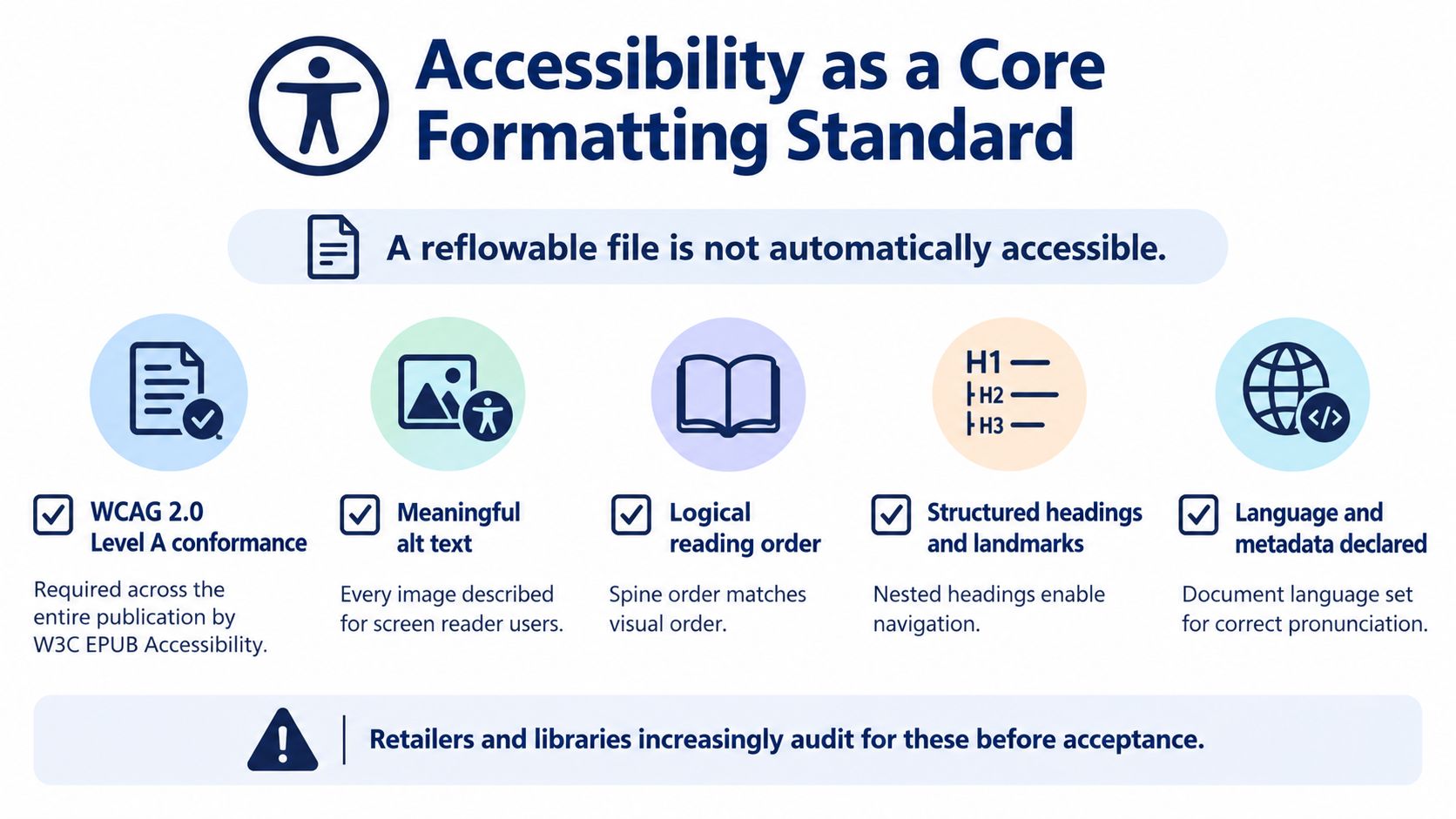
A reflowable file isn't automatically accessible. Flexible text helps, but accessibility also depends on the way the book identifies headings, images, language, reading order, and navigation.
W3C EPUB Accessibility requires, at minimum, WCAG 2.0 Level A conformance across the entire publication, according to the W3C mapping for EPUB accessibility and the European Accessibility Act. One inaccessible chapter, image, or content document can undermine the claimed level of conformance.
Structure that assistive technology can understand
A visual heading is not necessarily a semantic heading. Making text larger and bold may make it look like a chapter title, but a screen reader needs the underlying document structure to identify it as a heading and let the reader move through the document by heading level.
Professional formatting should use meaningful HTML elements for:
- Headings: A consistent hierarchy distinguishes chapters, sections, and subsections.
- Lists: Ordered and unordered items remain identifiable as lists.
- Figures and captions: Images connect to the text that explains them.
- Navigation landmarks: Readers can move to major parts of the publication.
- Page markers: Print-page relationships can remain available when citations depend on them.
- Language declarations: The package metadata and document attributes identify the language for more accurate pronunciation.
Image treatment requires judgment, not just a technical checkbox. A chart needs alternative text that communicates its purpose or an extended description when the details matter. A decorative flourish should be identified as decorative so a screen reader doesn't announce irrelevant information.
Keep three quality checks separate
Authors and vendors often call every inspection “validation,” but three different checks answer three different questions:
- EPUB validation: Is the package structurally formed, with valid references and required files?
- Accessibility review: Does the semantic structure support WCAG-oriented requirements, including headings, language, alternative text, and reading order?
- Human testing: Can a person move through the book comfortably with a screen reader, keyboard controls, and real reading software?
A technically valid EPUB can still provide confusing navigation or inaccurate image descriptions. The European Accessibility Act has applied since June 28, 2025, which makes accessible digital publications especially relevant for distribution in EU markets. Accessibility also improves ordinary reading: clear headings, useful links, logical notes, and predictable structure help anyone scanning or navigating a long book.
Common Formatting Pitfalls and Platform Requirements
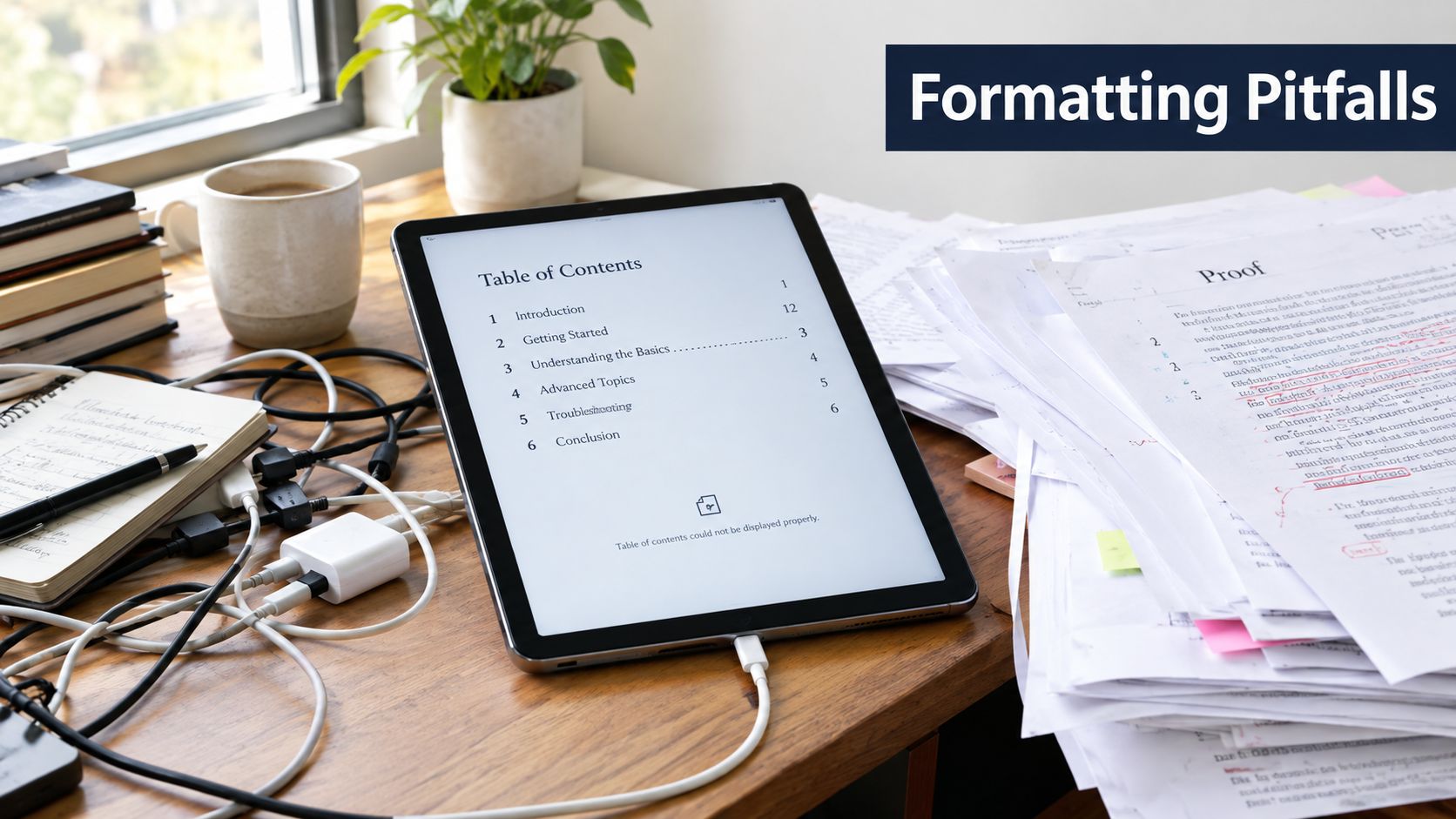
Retailer problems often begin with small production decisions that looked harmless in the manuscript. A manual page break may become a blank screen. A table designed for print may run beyond a phone's width. A font that worked on one computer may not be embedded or supported in the delivered package.
Defects that deserve a pre-submission inspection
- Broken table of contents: Each entry should lead to the correct chapter, front-matter item, or appendix.
- Wrong reading order: The spine should match the intended sequence, including notes and end matter.
- Oversized images: Images should remain readable without forcing horizontal scrolling on a small screen.
- Damaged tables: Wide tables may need restructuring, shorter labels, or an alternate presentation.
- Unusable footnotes: Note references and return links should work in both directions where the design calls for them.
- Missing styling declarations: An undeclared or incorrectly referenced stylesheet can leave chapters with default formatting.
- Legacy EPUB assumptions: EPUB 2 was considered obsolete by the Library of Congress by September 2014, so current production shouldn't depend on outdated conventions. The older EPUB version record explains the progression toward EPUB 3 and its modern content model.
A valid package can still look poor in a real renderer. EPUBCheck may confirm that files exist and references resolve, but it won't tell you that a table is uncomfortable to read, a chapter heading wraps awkwardly, or an image overwhelms the page. Test at least one reflowable ereader environment and one desktop or mobile reader, then inspect the book at different screen widths.
If a conversion produces unexplained text files or unfamiliar output, a focused guide to troubleshooting TXT files can help separate source-text problems from EPUB packaging problems.
The following video can provide another visual reference while you compare your own file's behavior across applications.
Before submission, read several chapters rather than checking only the cover and opening page. Test the table of contents, internal links, notes, images, tables, headings, and fonts. A retailer may accept a file that technically opens, but readers judge whether it feels dependable.
The Professional Formatting Process From Manuscript to Launch
A reliable workflow resembles a production line with quality gates. Each stage reduces a different kind of risk, so skipping ahead usually creates more work later.
A practical sequence
- Assess the manuscript. Identify chapters, front matter, end matter, notes, tables, images, special characters, and language needs.
- Choose the format track. Decide whether the book needs reflowable behavior or fixed visual composition.
- Build the structure. Create content documents, stylesheets, metadata, the manifest, spine, and navigation.
- Prepare visual resources. Resize and place images carefully, confirm captions, and handle meaningful descriptions.
- Construct navigation. Check the table of contents, landmarks, chapter links, notes, and return paths.
- Validate the package. Run EPUBCheck after every conversion and resolve all errors instead of suppressing warnings.
- Review accessibility. Inspect semantic headings, reading order, language declarations, alternative text, and navigation with assistive technology.
- Test real devices. Open the file in a reflowable ereader and a desktop or mobile reader at multiple screen widths.
That order matters. Testing before structure is stable creates misleading results. Validation without device testing misses rendering defects. Accessibility review without human testing can confirm markup while overlooking an experience that remains confusing.
BarkerBooks reports that it has published over 7,500 authors, has a 4.9 Google average rating, and distributes books in more than 91 countries through Amazon Kindle, Apple Books, Barnes & Noble, and Google Books, according to its publisher information. In an end-to-end workflow, interior layout and ebook formatting sit alongside the handoff and distribution tasks rather than being treated as an afterthought.
For authors preparing files independently, the same principle applies: define what “ready” means before uploading. The ebook preparation guidance can help you organize the manuscript, assets, and production questions before a formatter or publishing team begins work.
Formatting as an Investment in Your Readers
Formatting is not a cosmetic finish applied after the essential work. It determines whether readers can find chapters, resize text, understand images, follow notes, and read comfortably on the device they already use.
Choose the right format track. Build to current standards instead of legacy habits. Validate the package, review accessibility separately, and test the book in real reading environments. These steps protect the connection between your words and the reader's experience.
A polished cover may earn the first click, but dependable formatting supports the decision to continue reading. Every broken link, missing image description, awkward table, or misplaced chapter weakens that trust.
BarkerBooks offers end-to-end publishing support that includes interior layout, ebook formatting, and distribution preparation for major reading platforms. Visit BarkerBooks to discuss your manuscript and determine the formatting workflow your book needs.