
So, you've written a book and want to sell it on the biggest bookstore in the world. Smart move. But getting your book from a manuscript file to a live Amazon product page can feel like a maze. Let's break it down into a clear roadmap.
At its core, the process boils down to three big stages: preparing your book, choosing your publishing path, and then actually launching it to the world. A lot of authors get hung up on the marketing, but the truth is, success starts way earlier with a polished manuscript and a killer cover.
Your Publishing Roadmap on Amazon
Think of this as your game plan. Every author, from first-timers to seasoned pros, follows these fundamental steps. The journey really begins after you type "The End." That's when your manuscript transitions from a creative work into a commercial product. This means you can't skimp on professional editing or a cover design that instantly tells a reader, "This book is for you."
These first steps are your foundation. A weak foundation will crumble no matter how much you spend on ads later. This simple flow shows how it all connects.
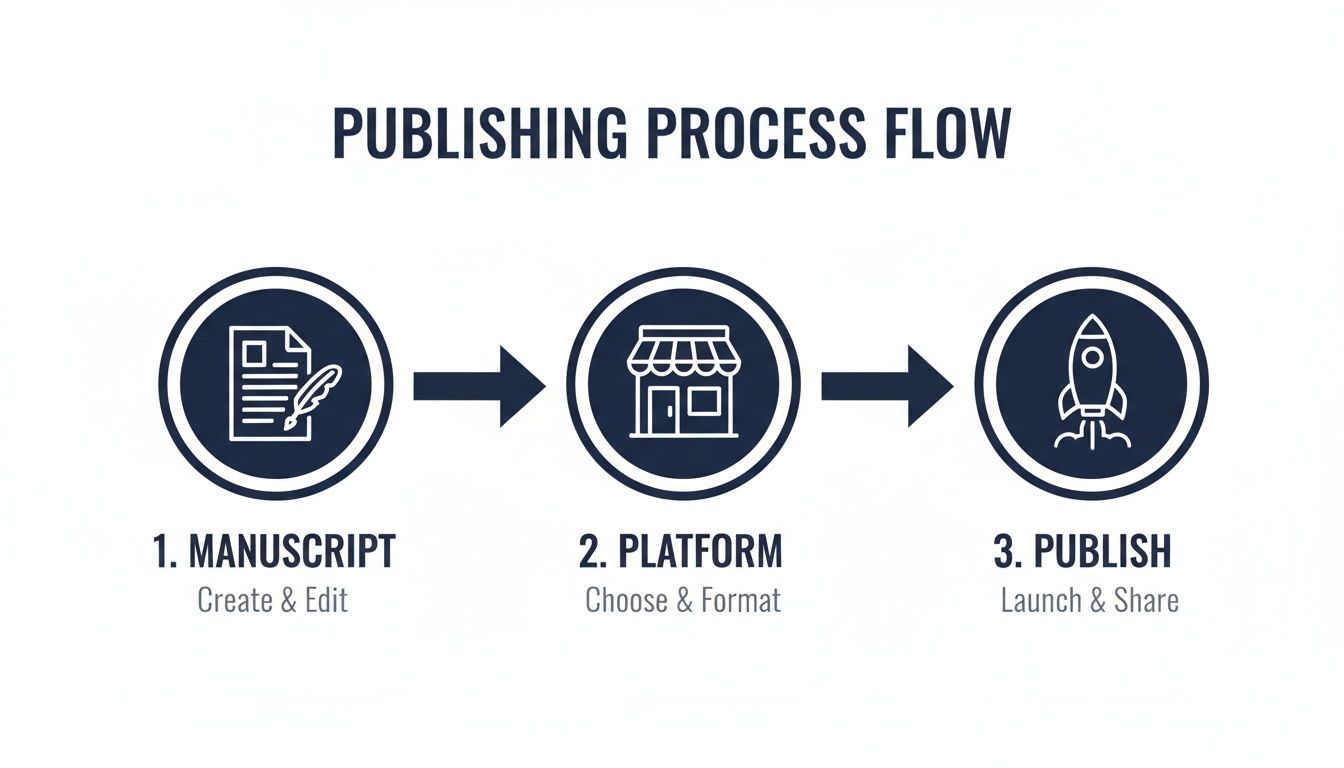
As you can see, everything flows from that polished manuscript. Once your book is truly ready, picking the right platform and handling the technical side of things becomes much less intimidating.
Understanding Your Options: KDP vs. Advantage
For most independent authors, the choice is clear, but it's crucial to know why. Amazon offers two primary channels for selling your books: Kindle Direct Publishing (KDP) and Amazon Advantage. They serve very different needs.
-
KDP is for self-publishers. It's a print-on-demand and ebook platform where you upload your files, set your price, and Amazon prints a copy only when a customer buys one. You are the publisher.
-
Advantage is for publishers or authors with existing inventory. It's a consignment model. You print the books yourself, ship them to an Amazon warehouse, and they fulfill the orders. Amazon acts as your distributor.
Here’s a head-to-head look to help you decide which path is right for you.
Amazon Publishing Platform Comparison KDP vs Advantage
| Feature | Amazon KDP (Kindle Direct Publishing) | Amazon Advantage |
|---|---|---|
| Best For | Independent authors, small presses, and anyone who wants a hands-off, print-on-demand solution. | Traditional publishers or authors who manage their own large-scale offset print runs and inventory. |
| Inventory Model | Print-on-Demand (POD). No upfront inventory costs. Books are printed and shipped as they are ordered. | Consignment. You must print, store, and ship inventory to Amazon's fulfillment centers at your own cost. |
| Upfront Cost | $0. It's free to upload and publish your book files. Costs only come from optional services like editing, design, or marketing. | High. You bear the full cost of printing thousands of copies, plus an annual program fee of $99.90 and shipping expenses. |
| Royalties | 35% to 70% for ebooks (depending on price) and a fixed 60% for print books (minus print costs). | Amazon takes a 55% cut. You receive 45% of the list price, from which you must also cover your printing costs. |
| Control | Full control over pricing, metadata, keywords, and cover. You can make changes anytime and they go live within 24-72 hours. | Limited control. Amazon sets the final selling price and manages discounting. Changes can be slower to implement. |
| "Ships from" Status | Your book is listed as "Ships from and sold by Amazon.com," making it Prime eligible. | Same "Ships from and sold by Amazon.com" status, as Amazon holds your stock. |
For 99% of self-published authors, Amazon KDP is the obvious and better choice. It removes the massive financial risk of printing and warehousing books, offering a direct path to the world's largest marketplace.
Why Self-Publishing on Amazon Is a Game-Changer
The indie author movement isn't just a trend; it's a fundamental shift in the publishing world. In 2023 alone, authors uploaded over 2.6 million new titles through KDP, a 7.2% jump from the year before. The gatekeepers are gone. You now have direct access to a market that commands over 50% of physical book sales and a staggering 68% of ebook sales in the US.
Your goal isn't just to get your book on Amazon; it's to do it right. That means understanding how all the pieces—your keywords, categories, launch strategy, and ongoing marketing—fit together to build momentum.
This guide is your blueprint for doing just that. We'll walk through every stage, turning complex decisions into simple, actionable steps. By the time we're done, you'll have a clear plan to not only publish your book but to give it the best possible chance of finding its readers.
Getting Your Manuscript and Cover Ready for Prime Time
Before anyone ever reads a single word of your book, they'll judge it by its cover and, if they buy it, by how it looks on the inside. In the massive, crowded aisles of Amazon, your manuscript and cover are your two most critical assets. They're your 24/7 sales team, and their quality is the single biggest factor in whether a reader clicks "Buy Now" or just keeps on scrolling.
Think about it from your own perspective as a shopper. You wouldn't buy a product that looks shoddy or broken. Readers feel the same way. They won't risk their time or money on a book riddled with typos or wrapped in a cover that looks like it was made in five minutes. If you're serious about selling, investing in professional preparation isn't optional—it's the price of entry.
This process really boils down to three make-or-break areas: editing, cover design, and interior formatting. Each one plays a huge part in shaping how a reader sees and experiences your book.
The Unskippable Steps of Editing
Publishing a manuscript without professional editing is like trying to stage a play without a director. The story might have potential, but the final product will feel clunky, confusing, and unprofessional. I've seen it time and time again: skipping this step is the fastest way to rack up those dreaded one- and two-star reviews that can permanently torpedo a book's chances.
Editing isn't just one thing; it's a series of layers, each tackling different problems.
- Developmental Editing: This is the big-picture view. A developmental editor digs into your book’s core structure, plot, character development, and pacing. They're the ones who ask the tough question: "Does this story actually work?"
- Line Editing: Now we're zooming in to the sentence level. A line editor hones your writing style, tightens up your prose, and makes sure your author voice comes through loud and clear on every page.
- Proofreading: This is the final, meticulous polish. Your proofreader is the last line of defense, catching those pesky grammar mistakes, spelling errors, and punctuation goofs that inevitably slip through.
A huge mistake I see new authors make is hiring a proofreader and expecting them to fix story-level problems. A proofreader's job is to fix a typo, not to tell you that your main character's motivation makes no sense or that the twist in chapter three completely contradicts the ending.
Before you even get to this stage, it's a good idea to have a solid grasp of your rights as a creator. Properly protecting your work is the foundation for everything that follows. For anyone needing a primer, this guide on understanding intellectual property protection is a great starting point.
Your Cover: The Most Important Marketing Tool You Have
On Amazon, your book cover has about three seconds to grab someone's attention. That's it. And most of the time, it's doing this as a tiny thumbnail, no bigger than a postage stamp. It has to instantly scream your genre, your tone, and "I'm a professionally published book."
A bad cover is a sales killer. It tells potential readers that the contents are probably just as amateur.
Picture this: A reader is scrolling through the "Thrillers" category on their phone. Dozens of book covers fly by. Their eyes will naturally land on the ones that fit the mold—covers with dark, high-contrast imagery and sharp, bold fonts that promise suspense. If your thriller has a cover with soft pastel colors and a loopy, handwritten font, it's going to be completely ignored because it’s sending all the wrong signals.
A great cover nails three things:
- It Fits the Genre: A romance cover needs to look like a romance. A science fiction cover needs to look like science fiction. Go look at the top 100 bestsellers in your category. That's what readers expect.
- It’s Clear as a Thumbnail: Your title and author name have to be perfectly readable even when they’re tiny. Complicated fonts and busy images just turn into an unrecognizable blur on a screen.
- It Looks Professional: Seriously, unless you are a professional graphic designer who specializes in book covers, hire one. There are fantastic marketplaces like 99designs or Reedsy where you can find designers who live and breathe this stuff.
Mastering Your Interior Formatting
Finally, we get to the inside of the book—what the customer actually reads. Nothing yanks a reader out of a story faster than sloppy formatting. I’m talking about weird spacing, ugly fonts, or a table of contents that doesn't work. These are the little things that scream "self-published" in a bad way and lead straight to negative reviews.
You'll need two distinct, perfectly formatted files: one for the ebook and one for the print version. They are not interchangeable.
- Ebook (EPUB): Ebooks use what's called "reflowable" text, which means the words can adjust to fit any screen size or font setting. The code behind it needs to be clean and simple to prevent glitches on Kindles, iPads, and phones.
- Print (PDF): Print books are the opposite; they need a fixed-layout PDF. Everything is locked in place, from the margins and page numbers to the headers and footers. You also have to account for technical details like "bleed" (for images that go to the edge of the page) and the "gutter" (the extra space in the middle where the book is bound).
Getting these technical details right is absolutely essential for a good reader experience. If you want to dive deeper into this, our guide on Kindle Direct Publishing formatting walks you through the entire process, step-by-step.
Diving Into Your KDP Account and Pricing Strategy
Alright, your manuscript is looking sharp and your cover is ready to grab some attention. The next step is connecting those files to a live Amazon product page, and that all happens inside your Kindle Direct Publishing (KDP) account. Think of KDP as your mission control for everything related to your book.
Setting up the account itself is pretty straightforward. You'll need to provide your author and tax information and link a bank account so you can actually get paid. Amazon walks you through a quick online tax interview to make sure you’re squared away with the IRS, which is a crucial step for a smooth payout process down the line.

Once your account is up and running, you'll face your first major strategic decision: how to price your book. This isn't just about plucking a number out of thin air. You need to understand Amazon's royalty structure to make sure you're actually maximizing your income.
Ebook Royalties: The 35% vs. 70% Decision
For ebooks, KDP gives you two royalty options: 35% or 70%. Which one you get isn't just a simple choice—it's tied directly to your book's price. Getting this right is absolutely fundamental to making money on the platform.
If you're aiming for that juicy 70% royalty rate, your ebook has to check a few boxes:
- The Sweet Spot: Your list price must fall between $2.99 and $9.99.
- Location, Location, Location: The sale has to happen in one of the "70% territories," which thankfully includes major markets like the US, UK, Canada, and Australia.
- Original Work: Your book can't be a public domain title.
Price your book below $2.99 or above $9.99, and you’ll automatically be placed in the 35% royalty tier. Now, getting a lower royalty might sound like a bad deal, but pricing a new book at $0.99 or $1.99 can be a smart move. It's a classic strategy to attract new readers or to hook them with the first book in a series.
Let’s run the numbers: Say you've written a killer thriller. If you price it at $4.99, you're in the 70% bracket, earning you about $3.49 per sale. But if you price it at $1.99, you drop to the 35% bracket and only make around $0.69. You'd have to sell five times as many copies just to earn the same amount of cash.
This flexible royalty structure is a big reason KDP is the king of the hill. Indie authors can pull in up to 70% on every sale—a rate that rivals Apple Books and often beats Google Play. When you think about Amazon's massive audience, the earning potential is huge.
How Paperback Pricing and Profits Work
Pricing a physical book is a whole different ballgame. With KDP's print-on-demand service, you pay zero upfront costs. Instead, a printing cost is automatically deducted from each sale. This cost varies based on your book's page count, trim size, and whether you opt for standard black and white or pricier premium color ink.
For paperbacks, Amazon offers a flat 60% royalty rate. Here’s how you calculate your take-home pay:
(60% of Your List Price) – Print Cost = Your Royalty
Let's break it down. Imagine your 250-page paperback costs $4.00 to print. If you set the list price at $12.99:
- Your 60% share: $12.99 x 0.60 = $7.79
- Your actual profit: $7.79 – $4.00 = $3.79 per sale
KDP won't let you price your book so low that it doesn't cover the printing cost. The platform has a handy built-in royalty calculator, which I highly recommend playing with. You can test different price points and see exactly how they affect your bottom line before you commit. It gives you the power to find a price that’s both competitive in your genre and profitable for you.
The KDP Select Dilemma: To Enroll or Not?
The last big decision you’ll make during setup is whether to enroll your ebook in KDP Select. This is an optional program where you give Amazon exclusive digital rights to your book for a 90-day period. And when they say exclusive, they mean it—you can't sell your ebook anywhere else. Not on Apple Books, not on Kobo, not even on your own website.
So, why would anyone agree to be exclusive? Because KDP Select unlocks some powerful promotional tools that are off-limits to other authors.
The Perks of KDP Select:
- Kindle Unlimited (KU): Your book is added to the KU library, where subscribers can read it for "free." You get paid for every page they read out of a global fund. It's a fantastic way to get discovered.
- Free Book Promotions: You can make your book free for up to five days each 90-day term. This is a go-to tactic for rocketing up the charts and gaining a ton of new readers fast.
- Kindle Countdown Deals: This feature lets you run a limited-time discount on your book, complete with a ticking clock on your product page to create a sense of urgency.
The trade-off, of course, is that you can't "go wide" and build an audience on other platforms. For new authors, the visibility from KDP Select’s promotional tools can be a game-changer. For authors who already have a following across different retailers, it's a much tougher call. To get a feel for the entire process, you can find a more detailed walkthrough in our guide on how to publish an ebook to Amazon.
Getting Your Book Discovered on Amazon
So, you’ve hit publish. Your book is officially live on the biggest bookstore in the world. Congratulations! Now for the hard part: making sure readers can actually find it.
Getting your book to show up in Amazon's search results isn't about luck; it's about strategy. Think of Amazon as a massive search engine, just like Google. Its algorithm, known internally as A9, uses specific bits of information from your book's page to decide when and where to show it to shoppers.
Your job is to feed that algorithm exactly what it's looking for. Every piece of your book's product page—from the title to the keywords you hide in the backend—is a signal that helps Amazon connect your book with the right readers.
Your Title and Subtitle: More Than Just a Name
A great cover might earn you a first glance, but it's your title and subtitle that will get you the click. These two elements have to pull double duty: they must be compelling enough to catch a human's eye and perfectly optimized for a search algorithm.
I’ve seen too many authors get a little too clever or poetic with their titles, and it costs them sales. When it comes to search, clarity always beats cleverness.
Let’s say you wrote a book on meditation. A title like "The Mindful Path" sounds nice, but it isn’t working very hard for you. Now, look at this:
- Title: The Mindful Path
- Subtitle: A Beginner’s Guide to Overcoming Anxiety and Finding Inner Peace Through Daily Meditation
See the difference? That subtitle is packed with phrases people actually type into the search bar, like "overcoming anxiety" and "daily meditation." This one simple tweak dramatically boosts the odds of your book showing up when someone is looking for a solution you provide.
Writing a Book Description That Actually Sells
Once a potential reader lands on your page, your book description has one job: convince them to click "Buy Now." This is your sales pitch, not a book report. Don't just summarize the plot or list your chapters. You need to speak directly to the reader's problems, needs, and desires.
Kick it off with a strong hook—a provocative question, a bold statement, or a problem they’ll immediately recognize. From there, show them how your book is the answer they've been searching for.
At the end of the day, every reader is asking themselves, "What's in it for me?" Your description needs to answer that question, focusing on the benefits and the transformation they'll get from reading your book.
You don't need to be a web developer to make your description look professional. A few basic HTML tags can make a world of difference in making it scannable and persuasive:
<b>and</b>: Use this to bold key benefits or phrases you want to pop.<i>and</i>: Add a touch of emphasis with italics for quotes or important questions.<ul>and<li>: Break up walls of text with bullet points. They’re perfect for listing key takeaways or features.
A clean, well-formatted description is far easier on the eyes and helps guide your reader straight to that buy button.
Backend Keywords and Categories: Your Secret Weapon
This is the part most authors get wrong, and it’s a massive missed opportunity. Beyond what readers see on your product page, Amazon gives you a behind-the-scenes control panel to fine-tune your book's discoverability. We're talking about your seven backend keyword slots and your two category choices.
Think of the seven keyword slots as your chance to target all the search terms that didn't quite fit in your title or description. Put yourself in a reader's shoes. What words would they use to find a book like yours?
- Go for long-tail keywords (phrases with three or more words). They're less competitive and more specific.
- Brainstorm synonyms and related concepts. If you wrote about "time management," add "productivity hacks" or "beating procrastination."
- Don't waste space by repeating words that are already in your title or subtitle. Amazon already has those.
For a deeper dive into making your book pop on the digital shelf, a solid guide to Amazon listing optimization can be a game-changer for any author looking to grow their sales.
Finally, your two categories are just as crucial. Don't settle for broad, crowded categories like "Fiction" or "Business." The real magic happens when you drill down into a niche. Why? Because it’s much easier to become a bestseller in a smaller pond.
Instead of Nonfiction > Self-Help, dig deeper to find something like Nonfiction > Self-Help > Stress Management. Hitting the #1 Bestseller spot in a specific sub-category gives your book a huge boost in visibility and provides the social proof that encourages even more readers to take a chance on it.
Your Launch Plan and Amazon Marketing Tools
Hitting "publish" on your book is an incredible feeling, but it’s really just the starting line. A solid launch strategy is what separates the books that vanish after a week from the ones that climb the charts and stay there. This isn't about one frantic day of promotion; it's a calculated plan to create buzz, lock in those first crucial reviews, and tap into Amazon's own marketing machine.
Think of your launch like this: you need to make a big enough splash in the first few weeks to catch the eye of Amazon’s algorithm. When that algorithm sees consistent sales, downloads, and a steady stream of good reviews, it starts doing the heavy lifting for you. It begins showing your book to new readers organically, kicking off a cycle of discovery that can sustain your sales long-term.

The good news? You don't need a massive marketing budget or a pre-existing fan base of thousands. What you need is a smart plan focused on building social proof and visibility right where it counts: on your Amazon book page.
Securing Those Crucial First Reviews
On Amazon, reviews are everything. They are the ultimate social proof, the signal to a potential buyer that your book is worth their time and money. A book with zero reviews is a tough sell, but even a handful of thoughtful reviews can instantly boost its credibility.
Your number one goal at launch should be getting your first 10-15 reviews. But you have to do it the right way. Amazon has very strict rules about this—paying for reviews or having your mom and cousins leave five-star ratings can get your book, or even your entire account, in serious trouble.
The professional way to do this is by building an Advanced Reader Copy (ARC) team. This is simply a group of readers who get a free, early copy of your book in exchange for an honest review on launch day.
- Tap Your Network: Start with your email list and social media followers. If you're part of any reader or writer groups, those are great places to find volunteers.
- Use a Service: Platforms like Booksprout or Voracious Readers Club are designed to connect authors with readers in their genre who are actively looking for new books to review.
- Be Clear and Organized: Give your ARC team a firm deadline (like within the first 72 hours of launch) and make it super easy for them by sending a direct link to the review page.
Remember, you're looking for honest feedback, not just a wall of five-star praise. A mix of authentic reviews feels much more trustworthy to a potential buyer than a page full of perfect-but-generic comments.
Enhancing Your Product Page with A+ Content
Once you start driving people to your book page, you have to convince them to click "buy." This is where A+ Content becomes your secret weapon. It’s a free tool for KDP authors that lets you replace the boring, text-only "From the Publisher" section with beautiful, custom-designed graphics and layouts.
Think of it as your own mini-website right on your Amazon page. You can use it to add large images, pull out compelling quotes, showcase your author brand, or even add comparison charts. It instantly makes your book page look more professional and polished.
For a new author, taking the time to create A+ Content signals to buyers that you're serious about your work. It's a massive, and free, upgrade to your sales pitch.
Getting Started with Amazon Ads
Organic discovery is the dream, but paid ads can give your book the rocket fuel it needs to take off. Amazon Ads is a game-changer because you're targeting readers who are already on the site, actively searching for their next read.
Don't let the idea of running ads scare you off. You can get started with a small budget—even just $5-$10 per day can start generating data and sales. The goal is to start small, test relentlessly, and figure out what resonates with readers. To really get this right, you'll want to dig into a comprehensive guide on Amazon advertising for books to learn the specific strategies that turn a small daily spend into consistent sales.
For your first campaigns, I'd suggest focusing on two ad types:
- Keyword Targeting Ads: These ads pop up when a shopper searches for a specific term. If you’ve written a thriller, you could target keywords like "fast-paced psychological thriller" or "crime novels with a twist."
- Product Targeting Ads: These ads let you place your book directly on the product pages of similar authors. It’s a brilliant way to ethically "steal" readers from your competition by showing your book to people who are clearly fans of your genre.
The best part about Amazon Ads is the data. You can see exactly which keywords and targets lead to clicks and sales. This allows you to cut what's not working and pour more of your budget into what is. It’s not a "set it and forget it" tool, but an ongoing process of tweaking and optimizing that can build a powerful, long-term marketing engine for your book.
Common Questions About Selling Books on Amazon
Even with the best plan, you're bound to have questions. Selling on Amazon has a lot of moving parts, so hitting a few snags is completely normal. I've gathered some of the most common questions I hear from authors to give you clear, direct answers so you can keep moving forward.
Do I Need an ISBN to Sell on Amazon?
This is a classic "yes and no" situation. It all comes down to the format of your book.
If you're publishing a print book (paperback or hardcover) through KDP, Amazon gives you a free ISBN. It’s convenient, but just know that this ISBN is tied exclusively to their platform—you can't use it if you decide to print your book somewhere else.
For ebooks, you don't need an ISBN at all. Amazon assigns its own unique identifier, the ASIN (Amazon Standard Identification Number), to every Kindle book. However, if your long-term strategy involves selling your ebook on other retailers like Apple Books or Kobo, it's a smart move to buy your own ISBN from a service like Bowker. Owning your ISBN gives you total control.
Can I Update My Book After Publishing?
Absolutely. This is one of the biggest perks of self-publishing with KDP. You can log into your account and upload a new manuscript or an updated cover file whenever you need to.
Once you hit "Publish," the changes usually appear on your book's Amazon page within 24 to 72 hours.
This flexibility is a lifesaver for:
- Fixing typos: Spotted a mistake after your book went live? It happens to everyone. A quick file swap is all it takes.
- Updating information: This is a huge deal for nonfiction authors. If facts change or you have new material to add, you can keep your book relevant.
- Refreshing your brand: A cover that looked great five years ago might feel dated now. A new cover can give a big sales boost to a book from your backlist.
How Do I Handle Copyright?
Technically, in the U.S., your work is copyrighted the moment you write it down. But that's not the full story.
Formally registering your work with the U.S. Copyright Office creates a public record of your ownership. This is the crucial step you need to take if you ever have to sue someone for infringing on your work.
While Amazon doesn't make you register your copyright before you can sell your book, I strongly recommend it. Think of it as essential insurance for your intellectual property—you hope you never need it, but you'll be glad you have it if you do.
Even without official registration, you should always include a copyright page in your book. Just add the copyright symbol (©), the year of first publication, and your name. It’s a simple, clear signal to everyone that the work belongs to you.
How Long Does It Take to Get Paid?
KDP pays author royalties monthly, but there's a bit of a lag. You can expect to receive your payment approximately 60 days after the end of the month where the sales happened.
For example, all the money you earn from book sales in January will be paid out around the end of March. This schedule gives Amazon time to process all the transactions and account for any customer returns.
You can check your sales reports anytime in your KDP dashboard to see how you're doing. Depending on where you live, you can get paid via direct deposit, wire transfer, or check. This predictable payment cycle makes it much easier to manage the financial side of your author business.
Navigating the world of publishing can feel complex, but you don't have to do it alone. At BarkerBooks, we've helped over 7,500 authors bring their stories to life with expert editing, design, and global distribution. Let us handle the details so you can focus on writing. Start your publishing journey with us today.