
So, you’ve finished your manuscript and you’re ready to share it with the world. Publishing your ebook on Amazon is a straightforward path: get your files ready, create a Kindle Direct Publishing (KDP) account, and upload everything through their dashboard. The best part? You can start seeing sales and tracking your progress almost right away.
Your Path from Manuscript to Published Author
Welcome to the practical, no-fluff guide to publishing your ebook on Amazon. We’re going to skip the obvious advice and get straight to the real-world challenges and decisions you’ll face using Kindle Direct Publishing. This isn’t just another checklist; it’s a roadmap from someone who’s been there, designed to help you navigate every step with confidence.
Taking your finished manuscript and turning it into an ebook available to millions of readers involves a few key stages. Getting a clear picture of the whole process now will help you feel in control and make smarter choices for your book’s launch.
From Your Desk to the Digital Bookshelf
The whole thing can seem intimidating at first, but it really breaks down into manageable pieces. Each step logically follows the last, systematically transforming your Word document into a professional, marketable product.
Here’s a bird’s-eye view of what we’ll walk through together:
- File Prep: This is where we nail the final edits, get the manuscript formatted correctly for Kindle, and design a cover that actually sells books in your genre.
- Account Setup: We’ll get your KDP account created, fill out your book’s crucial details (like the description and keywords), and sort out the necessary tax information.
- Launch Strategy: This is the fun part. You’ll decide on pricing, pick your royalty rate, and determine if you want to go exclusive with KDP Select or distribute your book to a wider audience.
- The Big Upload: You’ll upload your final files, use Amazon’s previewer to catch any pesky errors, and then hit that glorious “Publish” button.
The secret to success on KDP isn’t just uploading a file. It’s about being strategic with your metadata, cover, and pricing to find and attract your ideal readers. Think of it less like publishing and more like launching a polished product.
We’ll also dig into when it makes sense to DIY certain tasks and when you should absolutely bring in a professional for things like editing or cover design. Knowing where to invest your budget can make or break your book’s reception. Mastering this process is a huge part of learning how to become a published author today. Let’s get started.
Polishing Your Manuscript and Cover for KDP

Long before anyone reads a single word of your story, they’re going to judge your book by its packaging. It’s just human nature. A clean, professionally presented manuscript and a cover that pops are absolutely non-negotiable if you want to succeed on a platform as crowded as Amazon.
Think of these elements as your book’s first handshake. Getting them right isn’t just a box to check—it’s one of the most critical steps in the entire publishing process.
Preparing Your Manuscript File
Your book’s interior needs to look flawless on everything from a tiny smartphone screen to a large tablet. This means your formatting has to be clean and responsive, which is something a simple Word export rarely achieves on its own.
Amazon technically accepts a few file types, but the main players are DOCX (from Microsoft Word) and EPUB. You can upload a DOCX file directly, but I’ve seen this lead to countless formatting headaches—funky spacing, broken chapters, and an overall amateurish look.
This is why EPUB is the gold standard for ebooks. It’s a “reflowable” format, which means the text automatically adjusts to fit the reader’s screen and their personal settings (like font size). That adaptability is the key to giving your readers a great experience.
You’ve got a few paths to get your manuscript into a clean EPUB file:
- The DIY Route: If you’re comfortable with the technical side of things, you can format the book yourself. This involves a deep clean of your Word doc—stripping out weird formatting, setting consistent heading styles, and making sure your page breaks are in the right places. For a step-by-step guide, we have a detailed article on how to format a book for Kindle that walks you through it.
- Kindle Create: Amazon offers its own free tool, Kindle Create, which can convert your DOCX into a KDP-ready file. It’s a solid starting point for authors on a tight budget and gives you some basic styling options.
- Hiring a Pro: For a result that’s guaranteed to be pixel-perfect, your best bet is to hire a professional formatter. They live and breathe this stuff, ensuring your book is free from the distracting glitches that often lead to bad reviews.
A poorly formatted ebook is an immediate red flag. I’ve seen readers leave one-star reviews for amazing stories simply because of inconsistent spacing, jumbled text, or a table of contents that didn’t work. Don’t let a technical issue sink your book.
Designing a Cover That Actually Sells
Let’s be blunt: your cover is your number one marketing tool. On a jam-packed Amazon search page, it has maybe two seconds to grab someone’s eye and scream, “This is the book for you!”
A cover that looks amateurish gets scrolled past. Every time.
The design needs to work even as a tiny thumbnail. This means bold, clear typography and imagery that instantly signals your genre. A thriller cover has a completely different vibe than a romance cover, and yours must meet the expectations of readers in your niche.
Imagine a sci-fi author who poured their soul into a 500-page epic but then slapped on a DIY cover made with a generic font. When a reader is browsing the “space opera” category, they’ll skip right over it and click on the book with the sleek, professional design that looks like it belongs there.
KDP’s Technical Cover Specs
To save yourself a massive headache during the upload process, your cover file has to meet Amazon’s exact technical requirements. Getting this wrong can delay your launch.
Here are the specs you need to nail:
| Specification | KDP Requirement | Pro Tip |
|---|---|---|
| File Format | JPEG or TIFF | Always use JPEG. TIFF files are huge and offer zero visual benefit for ebooks. |
| Dimensions | Ideal is 2,560 x 1,600 pixels (a 1.6:1 ratio) | Don’t approximate. Hit these dimensions exactly for perfect clarity. |
| Color Profile | RGB | Never use CMYK, which is for print. It will make your colors look distorted online. |
| File Size | Under 50 MB | Easily achievable. A properly compressed JPEG will be well under this limit. |
Honestly, investing in a professional cover designer is often the single best marketing decision a new author can make. While tools like Canva are great for many things, a pro understands genre conventions, typography, and composition at a level that can make or break your book’s success. This is where your hard work truly starts to look like the polished, market-ready book it deserves to be.
Alright, you’ve got your polished manuscript and a killer cover. Now comes the part where we build the digital storefront for your book on Amazon. This is where you set up your Kindle Direct Publishing (KDP) account and plug in all the critical details that will help readers find—and buy—your work. Think of it as laying the foundation; get these administrative steps right, and everything else that follows becomes much easier.
First up, you need a KDP account. Head over to the KDP website and either sign in with your regular Amazon account or create a new one. Before you can hit publish, Amazon will need you to complete your author profile, plug in your payment information, and run through a quick tax interview. It might feel like a bit of a chore, but this is what ensures you actually get paid, so it’s well worth the time.
Crafting Your Book’s Identity on Amazon
With your account set up, you’ll head to your “Bookshelf” and click to start a new title. This is where you’ll enter your book’s metadata—all the specific info Amazon’s algorithm uses to categorize your book and show it to the right people. Every single field here is a chance to make your book more discoverable.
The first few fields are pretty straightforward:
- Book Title and Subtitle: The title is the name, but don’t sleep on the subtitle—it’s a massive marketing tool. You can use it to clarify your genre (“A Gripping Sci-Fi Thriller”) or, for non-fiction, spell out the main benefit (“A Practical Guide to Mastering Public Speaking”).
- Author and Contributors: Make sure your author name is exactly as you want it to appear. This is also where you can give credit to illustrators, editors, or any co-authors.
- Series Information: If your book is part of a series, linking it here is a no-brainer. It makes it dead simple for readers to find the next installment, which is how you build a loyal fanbase.
These details are the core of your product page. I always recommend double-checking everything for accuracy and impact before you even think about moving on.
Writing a Book Description That Sells
Your book description is your sales pitch. After your cover, it’s the single most important factor in convincing someone to click that “Buy Now” button. A huge mistake I see new authors make is just summarizing the plot. Your goal isn’t to summarize; it’s to create intrigue and stir emotion.
Start with a powerful, one-sentence hook that grabs them immediately. For a novel, hint at the central conflict and the stakes without spoiling the ending. If it’s non-fiction, clearly state the problem you solve for the reader and the transformation they can expect. Use short paragraphs, bold text, and bullet points to make the whole thing scannable.
I’ve seen incredible books with amazing covers completely fail to sell because the description was a dense wall of text. Remember, you’re writing for an online shopper with a short attention span. Break up the text, use compelling language, and end with a call to action that makes them eager to dive in.
Choosing Keywords and Categories to Get Found
This is where so many authors miss a golden opportunity. Your keywords and categories are how you tell the Amazon algorithm where to shelve your book in its massive digital library. Getting this right is a fundamental part of successfully publishing your ebook on Amazon.
You get to pick up to seven keyword phrases. Don’t just use single words—think like a real reader. What would someone actually type into the search bar to find a book like yours? For a historical romance set in Scotland, you might use phrases like “Scottish highlander romance,” “enemies to lovers historical fiction,” or “Viking romance novel.” To truly nail this, you should be conducting keyword research for SEO.
Next, you’ll choose two browse categories. My advice? Get as specific as you possibly can. Don’t just pick “Fiction.” Drill down to something like “Fiction > Romance > Historical Romance > Scottish.” Placing your book in a less competitive, niche category makes it much, much easier to earn that coveted “Bestseller” tag.
KDP has become the undisputed giant of self-publishing. An incredible 90% of self-published authors use the platform, which sees over 2.6 million new books published every year. With that much competition, strategic categorization isn’t just a good idea—it’s absolutely essential if you want to stand out.
Choosing Your Pricing, Royalties, and Distribution
Now that you’ve handled the creative side of things, it’s time to switch gears and think like a business owner. Deciding on your ebook’s price, royalty rate, and distribution strategy is where your hard work starts to translate into actual income.
This isn’t just about slapping a price tag on your book. It’s a strategic move that shapes how readers see your work and, ultimately, how much you earn from each sale.
Decoding the 35% vs. 70% Royalty Options
Amazon’s KDP platform gives you two main royalty options, and the difference between them is significant. At first glance, 70% royalties looks like a no-brainer. Who wouldn’t want the bigger piece of the pie? But, as with most things, there are a few strings attached.
To qualify for that coveted 70% rate, your ebook needs to hit a few key benchmarks:
- The Right Price: Your list price must be between $2.99 and $9.99. This is the pricing window Amazon considers the sweet spot for readers.
- The Right Place: The sale has to happen in a territory where the 70% option is available, which thankfully includes most major markets like the US, UK, and Canada.
- Original Work: Your book can’t be a public domain title, unless you’re publishing something unique like an original translation or an annotated edition.
If you don’t meet these criteria, you automatically land in the 35% royalty tier. This happens if you price your book at $0.99 for a launch promotion or go above $9.99 for a comprehensive non-fiction guide, for example.
One critical detail: the 70% option comes with a small “delivery fee” based on your file size, which is subtracted from your earnings. The 35% option doesn’t have this fee, making it a bit more straightforward for very large files.
Here’s a quick comparison to make the choice clearer.
Amazon KDP Royalty Options Compared
| Feature | 35% Royalty Option | 70% Royalty Option |
|---|---|---|
| List Price Range | Any price | $2.99 – $9.99 |
| Digital Delivery Fees | No delivery fees charged | Fees charged based on file size |
| Ideal For | Promotions ($0.99), high-priced niche books (over $9.99), or books with very large file sizes. | Standard-length books priced competitively to maximize per-sale earnings. |
| Geographic Availability | Available in all territories. | Only available in specific territories. |
Ultimately, your choice depends entirely on your strategy.
A Pro Move: Don’t write off the 35% option. Many successful authors price the first book in a series at $0.99. They take a smaller cut to draw in a wave of new readers who, hopefully, get hooked and buy the rest of the series at full price—where the 70% royalty kicks in.
All the metadata you’ve chosen—your title, keywords, and categories—is designed to lead readers to your book’s sales page. That’s where your pricing strategy takes over.
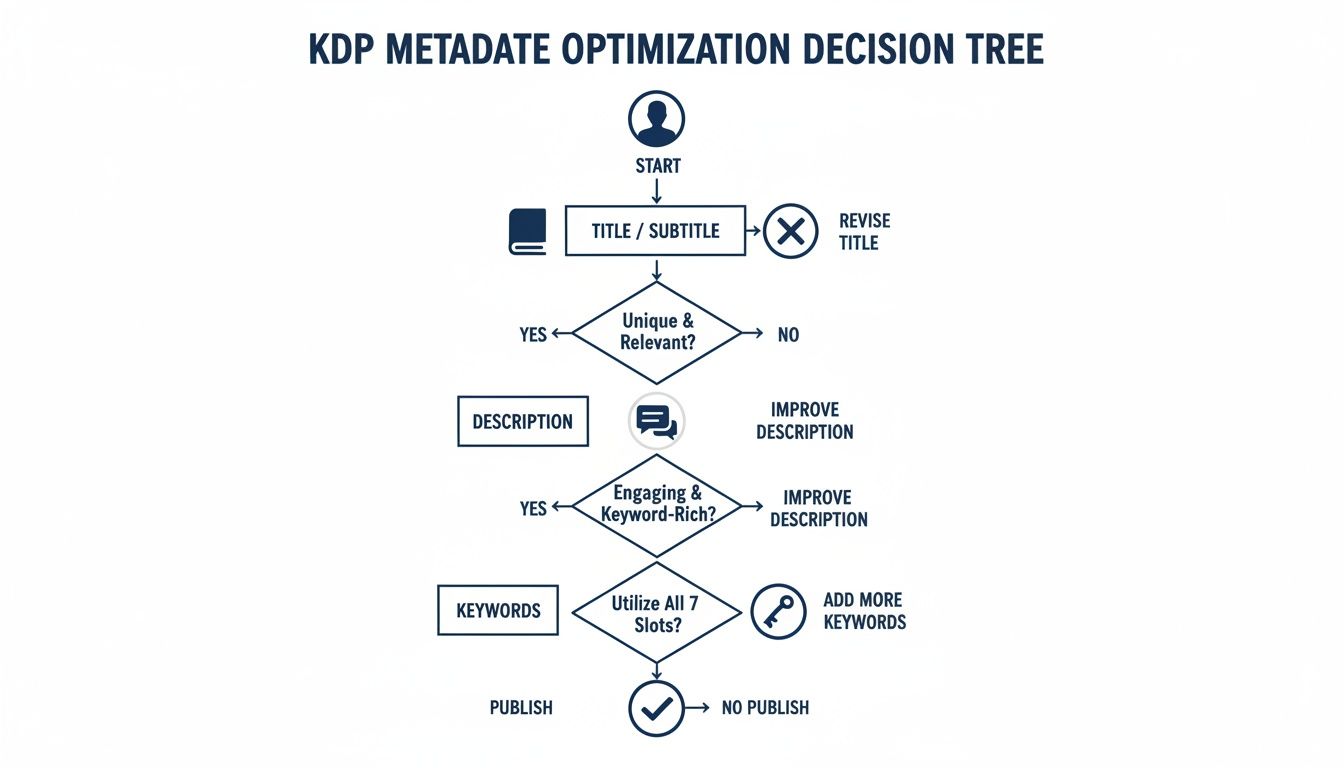
This entire process is a funnel. Your metadata catches the reader’s eye, and your price and cover seal the deal.
The Great Debate: KDP Select vs. Going Wide
Your next big decision is about exclusivity. Will you give Amazon exclusive rights to sell your ebook, or will you “go wide” and sell it on other stores like Apple Books, Kobo, and Barnes & Noble?
Enrolling in KDP Select means you’re committing to a 90-day exclusive partnership with Amazon for your ebook (it auto-renews, so you’ll need to opt-out if you change your mind). In return, Amazon gives you access to some powerful promotional tools:
- Kindle Unlimited (KU): Your book is added to the KU library, where subscribers can read it for “free.” You get paid for every page they read, which can add up to a substantial income stream, especially for page-turners in popular genres.
- Promo Tools: You gain the ability to run Kindle Countdown Deals (a temporary, tiered discount) or offer your book for free for up to five days to build buzz and hopefully climb the sales charts.
The alternative is going wide. This means you skip KDP Select and list your ebook on as many different retailers as you can. It’s a strategy that builds a more resilient author career by diversifying your income and reaching readers who don’t shop on Amazon. It’s a long game, but it can pay off.
The earning potential on KDP can be huge, but it’s far from guaranteed. Some authors make around $150 a month, while top-tier indie authors can pull in over $20,000 per month. As this data on self-publishing earnings from Zonguru.com shows, your success hinges on the choices you make with your genre, marketing, and royalty programs.
Setting Your Price with Confidence
Picking the right price for your ebook is more of an art than a science. A great starting point is to do some market research. Go look at the current bestsellers and new releases in your specific sub-genre. What are other authors—both new and established—charging?
For a debut author, pricing competitively at $2.99 or $3.99 is a solid strategy. It lowers the barrier for readers to take a chance on someone new.
The best part? Your price is never permanent. You can log into your KDP dashboard and adjust it anytime you want. Run a sale, test a new price point, or react to market changes—that flexibility is one of the biggest advantages when you publish an ebook on Amazon.
The Final Upload and Launch Process
You’ve done the hard work. The manuscript is polished, the cover looks incredible, and all your book’s details are ready to go. This is the moment where it all comes together. Let’s walk through the final technical steps to get your book live on the Kindle store.
First, you’ll upload your files. Inside your KDP dashboard, head over to the “Kindle eBook Content” tab. This is where you’ll upload your manuscript (your EPUB file is best) and that high-resolution JPEG of your cover.
This is also where you might hit your first snag. KDP can be picky. If you get an error about cover dimensions or funky internal formatting, don’t worry—it happens to everyone. Just make sure your cover is the required 2,560 x 1,600 pixels and that your manuscript file is clean.
Mastering the Preview Stage
Once Amazon processes your files, you’ll be prompted to preview your book. I can’t stress this enough: do not skip this step. This is your last chance to catch mistakes before readers do.
What you see in a Word document is a world away from how it will look on a Kindle. The KDP previewer is an excellent tool that shows you exactly how your book will appear on different devices.
Here’s what you should be looking for:
- Formatting Glitches: Are there weird gaps between paragraphs? Do your chapter headings look right? Are images centered and clear?
- Broken Links: Click every single link. Your table of contents, links to your website, everything. Make sure they all work.
- Overall Readability: Toggle between different views, from a big Kindle Fire tablet to a small phone screen. You need to ensure the reading experience is seamless on all of them.
For the most accurate check, I always recommend downloading the preview file and loading it onto my own Kindle or the Kindle app. It gives you a true real-world feel for the book. Catching a single typo or a formatting quirk now can save you from a one-star review down the road.
Pre-Order vs. Direct Launch
Alright, before you hit that final button, you have a big strategic decision to make: set up a pre-order or go for a direct launch?
A pre-order lets you list your book for sale up to a year before its release. This is a brilliant marketing move. It builds buzz, gives you a live sales page to promote, and—most importantly—all the sales you make during the pre-order period count toward your sales rank on launch day, giving you a massive initial boost.
A direct launch is much simpler. You click publish, and your book is typically live within 12 to 72 hours. This is a great option if you prefer a low-key release or just want to get your book into the hands of readers as quickly as possible.
My advice? If you have an email list or a social media following, even a small one, a pre-order campaign can be a game-changer. It gives your launch focus and momentum. If you’re just starting and the marketing side feels overwhelming, a direct launch is a perfectly solid strategy.
Once you’ve made your choice, all that’s left is that big, beautiful “Publish Your Kindle eBook” button. Click it. Amazon’s team will do a final review, and you’ll get an email as soon as it’s live. Your book is officially out in the world, and your journey as a published author has truly begun.
Your Post-Launch Marketing Playbook

Hitting “Publish” on KDP feels like the finish line, but it’s really the starting gun. Now that your book is live on the world’s biggest bookstore, the real work begins: getting it in front of the right readers.
Those first few weeks are absolutely critical. This is your launch window, and your main job is to drive as much traffic as possible to your book’s page and start collecting those crucial early reviews. Social proof is king on Amazon. The more reviews you have, the more Amazon’s algorithm will show your book to new potential buyers.
Kickstarting Your Sales Momentum
If you decided to enroll in KDP Select, you’ve got some powerful promotional tools at your fingertips. Used correctly, they can give your ebook a serious visibility boost right out of the gate.
Here are the two main ones you’ll want to use:
- Kindle Countdown Deals: This lets you run a limited-time, tiered discount for your book. The ticking clock creates a real sense of urgency, which is fantastic for driving a quick spike in sales.
- Free Book Promotions: You can make your ebook free for up to five days every 90-day KDP Select term. It’s a classic strategy, especially for the first book in a series. Hook them with a freebie, and they’ll often come back to buy the rest.
A quick tip from experience: Never just turn on a promotion and walk away. You have to coordinate your efforts. Tell your email list about it. Post on social media. I’ve even had great success using book promotion sites to amplify the message and get thousands of downloads.
Of course, sales are only half the battle. Getting those first few honest reviews is just as important. While you can’t pay for reviews, you can absolutely ask for them. A simple, polite request in the back of your book works wonders. I also send a follow-up email to my mailing list about a week after launch, gently reminding them that a review would be a huge help.
Want to dive deeper into this? We’ve put together a ton of other strategies right here: https://barkerbooks.com/how-to-promote-your-book-on-amazon/
Checking the Scoreboard: Your KDP Reports
Your KDP dashboard isn’t just for checking royalty payments—it’s a goldmine of data. Get in the habit of checking your sales reports regularly. You can start connecting the dots between your marketing and your sales.
Did that Facebook ad campaign actually move the needle? Did running a free promotion lead to a bump in sales for your other books? This is how you figure out what’s working and what’s not, so you can stop wasting time and money.
Understanding this data is also key for financial planning. Staying informed is just part of the job. To really grow your author business beyond just Amazon, you’ll need a solid grasp of the bigger picture. This digital marketing guide for small businesses is a fantastic starting point for building the skills you need for a long-term author career.
Common Questions About Publishing on Amazon
Even with the best step-by-step guide, you’re bound to have some specific questions pop up as you get closer to publishing your ebook. Let’s tackle some of the most common ones I hear from authors new to the KDP world.
Do I Need an ISBN for a Kindle Ebook?
Straight answer? No. You don’t need to go out and buy an ISBN to publish on Kindle.
The moment you upload your book, Amazon will assign it a unique 10-digit Amazon Standard Identification Number (ASIN). Think of it as your book’s social security number within the Amazon universe—it works perfectly for everything you need on their platform.
So, when should you buy an ISBN? If you have bigger plans. If you’re thinking about a print version or want to sell your ebook on other stores like Apple Books or Kobo, getting your own ISBN is a smart move. Owning the ISBN makes you the official publisher, giving you total control wherever your book is sold.
How Long Does It Take for My Book to Go Live?
You’ve clicked the final “Publish” button. Now what? Your book heads into Amazon’s review queue. Officially, they say it can take up to 72 hours.
But in my experience, it’s almost always faster than that. Most ebooks I’ve published have gone live on the Kindle store within 12 to 24 hours. During that waiting period, Amazon’s team is just making sure your files meet their content and quality standards. You’ll get an email the second it’s live.
My advice? Don’t hit refresh every five minutes. The review time can fluctuate, especially during busy seasons. This is the final little hurdle, so a bit of patience goes a long way.
Can I Make Changes to My Book After Publishing?
Yes, and this is one of the absolute best things about publishing with KDP. You have complete freedom to update your book whenever you want.
Found a typo that slipped past your editor? Easy fix. Need to update a chapter in your non-fiction book with new information? No problem. Want to test a new cover design or tweak your keywords? You can do it all.
Just log into your KDP dashboard, find your book, and you can upload a new manuscript, cover, or update your book’s details. It goes through the same short review process again, and the new version seamlessly replaces the old one, usually within a day or two. It’s a powerful way to keep your book feeling fresh and professional.
Publishing your first ebook is a massive achievement, but you don’t have to figure it all out by yourself. The expert team at BarkerBooks has guided over 7,500 authors through everything from editing and cover design to global distribution. We can help turn your manuscript into a polished, professional book that finds its readers. Learn more about our publishing packages today.