
You finish your manuscript, choose a font, and discover that changing the margins moves every chapter opening. That's the first lesson in layout design for books: page decisions work together, not independently.
Why Page Architecture Shapes Every Reading Experience
A compositor working on Gutenberg's Bible had to make dense text feel orderly, then repeat that arrangement throughout a substantial book. As Britannica's history of typography describes, Gutenberg's Bible used two justified columns and contained about 1,286 pages. Its page architecture helped coordinate paper use, production time, and consistency.
An antique spread makes that relationship between the physical book and its reading surface visible.
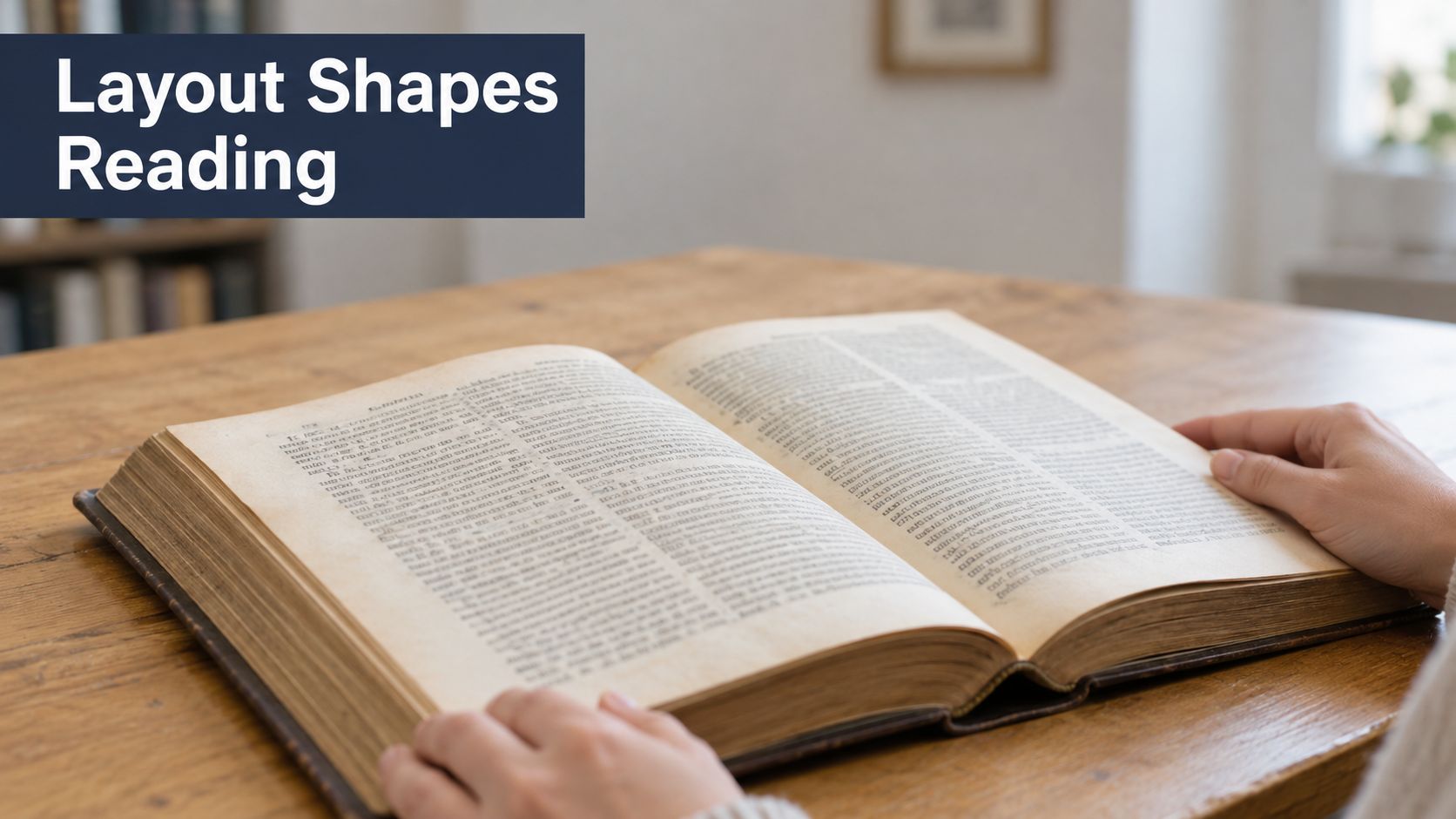
Modern interiors still depend on consistent columns, even typographic colour (the apparent darkness of a text block), controlled word spacing, and deliberate density. Layout is the combined arrangement of page size, margins, type, grids, images, and front matter.
Layout is a building's floor plan. Readers notice it most when something obstructs their way.
A cramped binding edge or stranded heading can interrupt an otherwise fluent passage. A reliable design starts with page dimensions and readable text settings, then accommodates grids, format differences, and accessibility before production and proof approval.
Trim Sizes and Margins Reference Table
Read each margin entry as a design instruction, not a universal printer requirement. Trim size means the finished page dimensions after cutting.
Common trim sizes and margins for print interiors
The sizes below are candidate formats for comparison, not claims that every printer offers them.
| Trim size | Common use | Typical margins (in/out/top/bottom) | Text block width |
|---|---|---|---|
| 5 × 8 in | Novels, memoirs, poetry | Inside: binding allowance; outside: comfortable grip; top: heading clearance; bottom: folio clearance | Page width minus inside and outside margins |
| 6 × 9 in | Trade nonfiction, business books | Approximately 1 in at each side for the example below; top and bottom set by page furniture | About 4 in in the example |
| 7 × 10 in | Textbooks, illustrated nonfiction | Inside: binding allowance; outside: annotation or caption space; top and bottom: grid-led | Calculate after allocating captions and columns |
| 8.5 × 11 in | Workbooks, manuals | Inside: binding allowance; outside: writing clearance; top and bottom: activity-led | Calculate from the usable writing area |
The worked example in Reidhead Editions' book typography guidance uses a typical 6 × 9-inch trade page with approximately 1-inch side margins, yielding about a 4-inch measure, which can accommodate approximately 60–68 characters per line in a suitable 11-point serif face. The same guidance gives a broader production target of approximately 50–75 characters per line, including spaces.
Separate the binding allowance from visual balance
The inside margin faces the binding; the outside margin faces the reader's hand. In a tightly bound paperback, enlarge the inside allowance when necessary so the visible text doesn't disappear into the curve.
That adjustment changes the measure. You can't widen the inside margin while preserving the same outside margin and text width unless you also enlarge the page.
The bottom margin often needs more visual weight than the top, especially when it contains page numbers. Don't divide leftover space equally merely because the software makes that convenient.
Let the content shape the exceptions
An illustrated book may need space beside images for captions, while a workbook needs room for handwriting. A full-bleed photograph follows a different rule: the image extends beyond the trim, while important details remain safely inside it.
For bilingual editions, test actual passages in each language before committing to a shared frame. Translated headings and unfamiliar hyphenation patterns can disrupt an arrangement that looks balanced in the other language.
Use the guide to traditional book sizes to compare format options before choosing a production service. If you're considering adhesive binding, The Print Warehouse Ltd.’s information on custom perfect binding for booklets is a useful starting point for discussing binding constraints with a supplier.
Get the chosen printer's specification before building the template. Its minimum margins and available formats take precedence over a reference example.
Type Size, Leading and Line Length Working Together
A typeface doesn't determine reading comfort on its own. Body size, leading, and line length interact: wider letters shorten the line, extra leading reduces the lines per page, and a narrower measure creates more paragraph endings.
The University of Wisconsin–Oshkosh typography summary reports that readers generally performed best at approximately 10 or 11 points, depending on the typeface, and recommends roughly 60–70 characters per line with approximately two points of added leading. Those findings are useful starting conditions, not a promise that a particular setting will suit every reader.
Leading range and pairings by body size
These are hypothetical test settings for a sample spread, not additional experimental findings. The ranges show alternatives to compare rather than automatic defaults.
| Body size | Leading range | Common pairing to test | Watch for |
|---|---|---|---|
| 9 pt | 11–13 pt | 9/12 pt | Small text can become tiring; consider it for notes rather than continuous reading |
| 10 pt | 12–14 pt | 10/13 pt | A compact page still needs a manageable measure |
| 11 pt | 13–15 pt | 11/14 or 11/15 pt | Compare paragraph texture and available page depth |
| 12 pt | 14–16 pt | 12/15 or 12/16 pt | Larger letters can produce frequent breaks in a narrow frame |
Read the setting, not just the font name
In typesetting notation, the number before the slash is the type size; the number after it is the baseline-to-baseline distance. Leading is not the visible white gap between letters on adjacent lines.
Say you're comparing the compact pairing and the more open pairing in the table. The compact version might suit a reference work with frequent headings, while the open version may feel calmer in uninterrupted narrative.
Different fonts at the same nominal size can look surprisingly different. Inspect the lowercase letters, counters, punctuation, and italic forms in actual prose, rather than choosing from a font menu preview.
Diagnose the visible problem
- Long lines: Readers must travel farther before finding the next line. Narrow the text frame or reconsider the type metrics before shrinking the text.
- Rivers: Loose spaces in justified paragraphs can align into distracting channels. Adjust paragraph composition, hyphenation, and word-spacing limits together.
- Hyphenation runs: Repeated hyphenated endings create a ragged-looking edge even in justified text. Check language dictionaries and permitted consecutive hyphens.
- Widows and orphans: Isolated paragraph lines at page boundaries interrupt continuity. Use paragraph controls, then inspect the resulting blank space elsewhere.
Don't fix a river by inserting repeated spaces. That creates a local patch that can fail after the next editorial correction.
Practical rule: Diagnose the cause before changing the setting. A narrow frame, unsuitable font, and restrictive hyphenation can produce similar symptoms.
Finish the test with a representative spread containing dialogue, italics, a long paragraph, and subheads. A decorative title page can't tell you whether sustained reading will feel comfortable.
Grids and Image Placement
Build the grid on parent pages, sometimes called master pages, before flowing the manuscript. A narrative usually needs a main text column; a reference title may need separate areas for explanations, illustrations, and captions.
The column grid controls horizontal placement. A baseline grid controls vertical rhythm, so align its increment with the chosen body leading and check that facing pages sit level.
Give images a predictable relationship to text
- Place at intended size. Inspect effective resolution after scaling, using the printer's image requirements rather than the source file's label.
- Keep images and their captions within the text block unless you've deliberately designed a bleed.
- Align to the grid. A photograph should relate to a column boundary, not float somewhere between the text and page edge.
- Protect faces, diagram labels, and other critical details from the binding curve.
- Establish caption behaviour. Choose a consistent position and a subordinate but readable style, then keep the caption attached to its image.
Avoid forcing every caption onto the body baseline grid if that produces awkward gaps. Consistent spacing can matter more than rigid alignment for small supporting text.
Decide whether figures stay anchored to relevant passages or occupy fixed positions. Anchored figures follow editorial changes; fixed figures require closer attention when text moves.
Front matter can use separate parent pages while retaining shared alignment guides. That allows a restrained title page and a denser contents page to belong to the same book without looking identical.
Print and Ebook Layouts Compared
In print, you determine the page. In a reflowable ebook, the reading system combines your styling with the reader's screen, settings, and preferences.
A printed spread and a tablet may contain the same words without sharing the same layout.
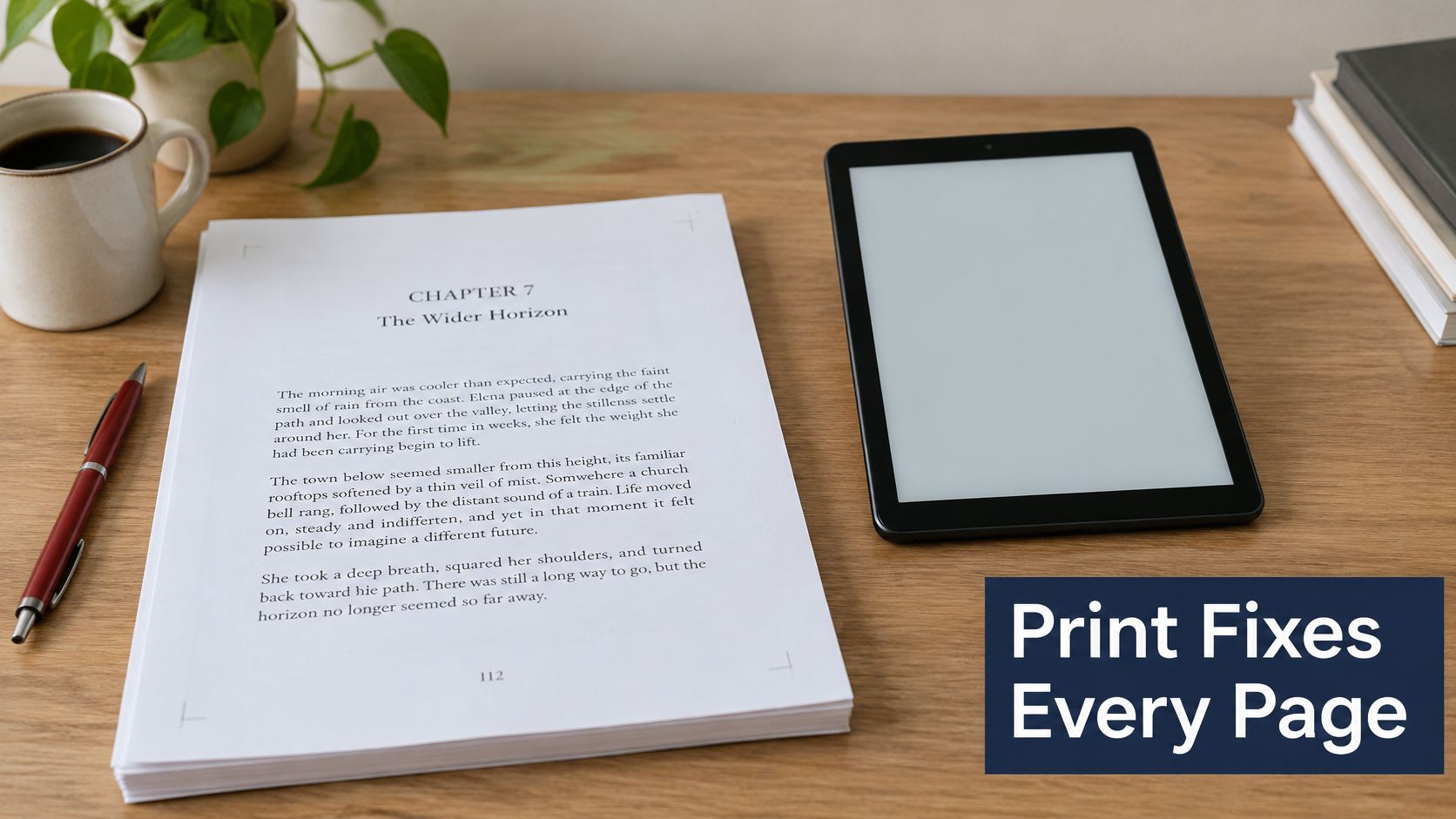
Print and ebook layout differences
| Criterion | Print PDF | Reflowable EPUB | Fixed-layout EPUB |
|---|---|---|---|
| Page control | Exact, set by the designer | Screen and reader settings determine pagination | Exact composition, scaled to screen |
| Font and size | Fixed by the design | Reader can usually override | Generally fixed within the page |
| Images | Positioned by page; bleed possible | Responsive images in the reading sequence | Positioned within a fixed composition |
| Navigation | Printed contents and page numbers | Navigable contents and structural headings | Navigable contents with supported structural navigation |
| Best suited for | Physical books and precise print composition | Novels and text-heavy nonfiction | Picture books, comics, and visually dependent titles |
| Main risk | Poor breaks and production errors | Broken reading order or inflexible styling | Tiny text and awkward reading on small screens |
Preserve meaning rather than coordinates
A print template full of positioned text boxes doesn't automatically become a usable ebook. The source needs real headings, lists, tables, and anchored references so the exporter can preserve relationships rather than page coordinates.
Fixed-layout EPUB can suit a comic or a picture book whose meaning depends on composition. Some cookbooks also benefit, but a recipe collection with mostly continuous text may work better as reflowable content.
For novels and text-heavy nonfiction, avoid fixing pages merely to preserve attractive print chapter openings. Readers shouldn't have to zoom and pan through ordinary paragraphs.
When preparing a brief for a designer, collect examples that explain hierarchy, pacing, and image relationships. The Online College of Art & Design's OCAD's graphic portfolio guide offers a useful reference for organising visual examples into a coherent presentation.
Use the accompanying video as a visual supplement while reviewing the format choices.
Prepare accessibility in the source
The 2025 draft EPUB Accessibility specification requires accessibility metadata and requires conforming publications to identify their accessibility standard through a conformsTo property. Treat this as a draft specification, not a blanket statement about legal obligations.
Prepare these elements before conversion:
- Heading hierarchy: Assign structural levels rather than making ordinary paragraphs look like headings.
- Image purpose: Describe informative images and identify purely decorative images appropriately.
- Reading sequence: Put sidebars, notes, and illustrations in a meaningful order.
- Language information: Identify the publication language and changes within the text.
- Links and tables: Use meaningful link text and genuine table structures.
Font Myths and Readability Choices That Hold Up
A dyslexia-friendly label doesn't guarantee easier reading. Nor does adding serifs automatically make a book more accessible.
Deckle's guide to choosing a book-interior typeface summarises evidence finding no definitive serif-versus-sans-serif advantage and no benefit, sometimes worse outcomes, from specialist dyslexia fonts; it also describes clear-print guidance recommending approximately 12–14-point text. That guidance concerns accessible presentation, not a universal minimum for every trade book.
Common readability claims and verdicts
| Claim | What the evidence supports | Verdict for authors |
|---|---|---|
| A dyslexia-friendly typeface improves reading | Specialist-font studies haven't established a benefit | Choose a familiar, well-spaced face and test it |
| Serif fonts are easier to read than sans-serif | No definitive advantage either way | Choose for the content and maintain consistency |
| Older readers need larger type | Clear-print guidance favours larger text | Offer an appropriately enlarged edition without assuming identical needs |
| Left alignment helps comfort | Clear-print guidance favours left alignment | Use it when controlled justification isn't practical |
Replace the font shortcut with design decisions
Typeface choice is closer to choosing a car's paint than its engine. It affects character and recognition, but size, spacing, contrast, and reader control do much of the practical work.
Start with adequate apparent size. Inspect the printed lowercase letters, not just the nominal point value. Don't describe a modestly enlarged trade setting as a large-print edition without checking the intended audience's needs.
Improve spacing before buying a specialist font. Look for crowded lines, tight punctuation, or distracting word gaps. A new typeface can leave all those problems untouched.
A familiar typeface with comfortable spacing is a more useful starting point than an accessibility promise on a font label.
Make contrast and consistency deliberate
- Ink and paper: Check the actual stock. A pale grey that looks elegant on a bright monitor may become faint in print.
- Emphasis: Use italics or a restrained bold style with a clear purpose. Avoid long passages in capitals or decorative lettering.
- Genre fit: A neutral face may serve a practical manual; a literary serif may suit a novel. Neither choice excuses poor spacing.
- Reader control: Don't lock digital text into images to protect a preferred appearance.
The guide to popular book fonts can help you assemble candidates. Compare them using the same passage and page geometry, otherwise you won't know whether you prefer the font or just its roomier setting.
Ask intended readers to inspect the sample where possible, including readers with relevant access needs. Their feedback can reveal faint notes, confusing characters, or tiring density that a designer overlooked.
For digital editions, test enlarged text and substituted fonts across reading systems. A sturdy design preserves meaning when the reader changes its appearance.
How to Build a Print-Ready Template Step by Step
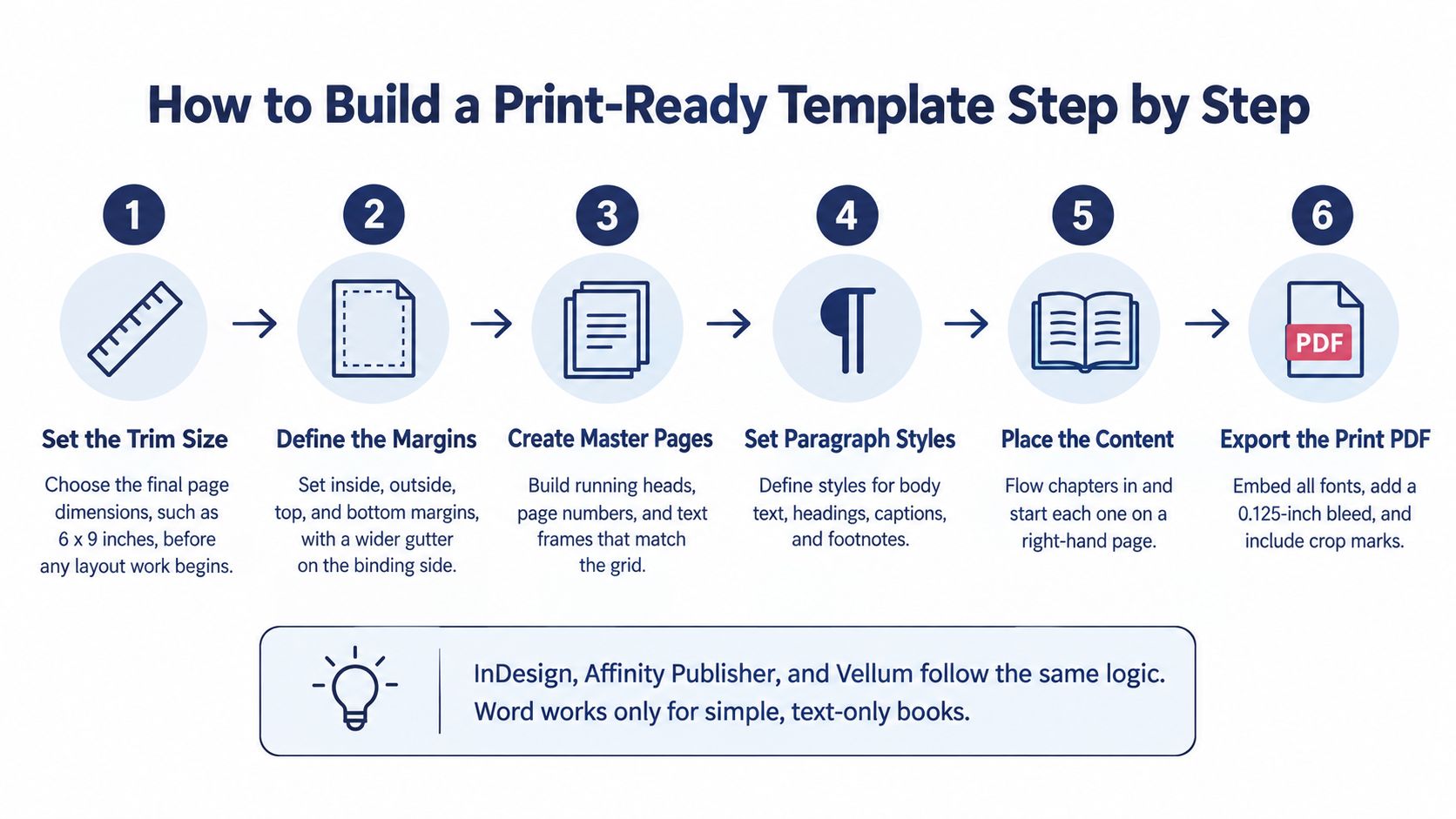
InDesign and Affinity Publisher provide detailed page control; Vellum offers a more guided workflow. Word is workable for straightforward text-led books, although complex positioning and production checks demand more care.
Use this process graphic as an overview, then let the printer's specification govern the final settings. Chapter-start conventions, bleed, and crop marks aren't universal requirements.
Build structure before correcting pages
Create the document geometry. Choose the candidate format using the Trim Sizes and Margins Reference Table, then enter the printer-approved trim, margins, and bleed. Use facing pages for a conventional bound interior. Common slip: setting the document to the paper sheet rather than the finished page.
Define paragraph and character styles. Establish body text, chapter titles, subheads, running heads, captions, and notes. Use the Leading Range and Pairings table to choose a test setting, then record intentional exceptions in named styles. Common slip: local formatting that prevents later style changes from applying consistently.
Build the parent pages. Create suitable layouts for ordinary left and right pages, chapter openings, and front matter. Suppress running heads where they would compete with opening typography, and use automatic page-number fields. Common slip: typing page numbers manually.
Import and flow the manuscript. Map source styles to layout styles, inspect italics and special characters, and remove empty paragraphs used as spacers. Apply keep-with-next behaviour to headings instead of inserting repeated returns. Common slip: preserving accidental manuscript formatting as though it were intentional design.
Resolve composition before export
Place and check artwork. Use the grid rules to position images and attach captions. Inspect effective resolution at final dimensions, confirm permissions, and extend intended bleeds to the document's bleed boundary. Common slip: enlarging an image until its output quality falls below the printer's requirement.
Correct pagination systematically. Review isolated lines, stranded headings, awkward tables, notes, and uneven chapter endings. Ask the printer whether the binding process requires particular page-count increments; don't assume every production method uses the same signature structure. Common slip: forcing a neat ending with aggressive tracking across an entire chapter.
Export and validate separate deliverables. Produce the print PDF using the printer's preset, then generate the EPUB through a structure-aware workflow from the styled source. Open the exported files rather than relying on the layout application's preview. Common slip: treating successful export as proof that the files are correct.
For the InDesign export controls, use the practical guide to saving an InDesign document as a PDF. Record the accepted preset with the project so later corrections don't introduce different production settings.
Export settings by output format
| Output | Setting | Typical value or governing rule | Why it matters |
|---|---|---|---|
| Print PDF | Image resolution | Printer-approved effective resolution at final size | Prevents soft or pixelated output |
| Print PDF | Bleed | Printer-specified extension beyond trim | Prevents unintended white edges |
| Print PDF | Colour mode | Grayscale for an intended monochrome interior | Prevents accidental colour content |
| Print PDF | Fonts | Embed all permitted fonts | Preserves typography on another system |
| Print PDF | Standard | Printer's accepted PDF preset | Matches the production workflow |
| EPUB | Image colour and size | RGB; appropriately compressed JPEG or PNG | Balances clarity and file size |
| EPUB | Structure | Semantic headings, image alternatives, and language information | Supports navigation and assistive technology |
Approve Your Proof Only After These Checks
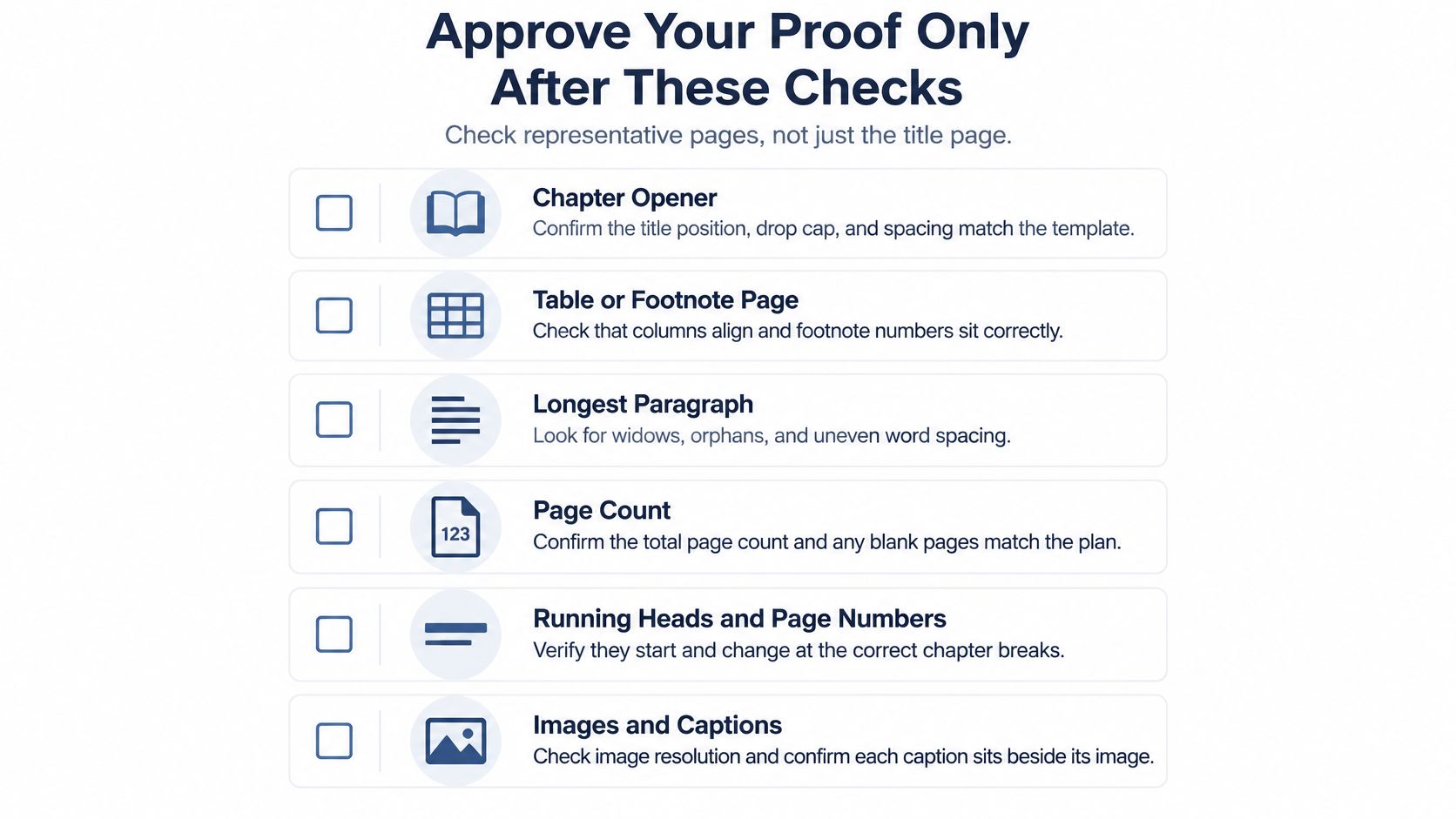
Approve the exported edition, not your memory of the manuscript. Inspect representative pages and read selected passages continuously, because a page can look balanced while containing missing text or a broken reference.
Use the checklist as a prompt for a deliberate proofing pass.
Check the physical and digital editions separately
- Representative pages: Examine a chapter opener, a table or footnote page, the longest paragraph, and a heading close to a page break. Confirm that no content vanished during composition.
- Physical handling: Read the print proof at actual size. Open it naturally and inspect the visible gutter, running heads, page numbers, paper show-through, and image detail.
- Language-specific composition: Proof each language independently in a bilingual edition. Check accents, punctuation, hyphenation, translated headings, and the correspondence between parallel passages.
- Ebook behaviour: Open the EPUB on a phone, tablet, and e-reader where available. Follow contents entries, note backlinks, and internal references; inspect image alternatives and accessibility metadata.
- Publication identity: Match the title, subtitle, author name, edition information, and assigned ISBN against the production records and relevant files.
- Final corrections: Keep a correction log and inspect every changed location after re-export. Check adjacent pages too, because a small correction can shift a later break.
Decide whether to build or hire
A finished manuscript, basic software skills, and a straightforward text-led book make a reasonable do-it-yourself project. Allow time for learning the application and obtaining a physical proof, not just arranging the first attractive spread.
Complex illustrations, parallel-language composition, demanding tables, or a tight launch date justify hiring a layout specialist. Ask for a representative sample and a clear deliverables list covering source files, print output, ebook output, and correction rounds.
Approve only when both the content and the exported behaviour are right. An attractive interior is part of the result, but reliable reading is the purpose.
BarkerBooks offers interior layout, editorial support, and preparation for print and ebook publication. If you'd like help turning your manuscript into a consistent, readable interior, visit BarkerBooks to discuss your formats, illustrations, language requirements, and production needs.