
So, you’re trying to figure out the exact Kindle format for your ebook? The short answer is simpler than you might think. While Amazon uses its own special formats like KFX and AZW3, you don’t actually create those yourself. As an author, your job is to give Kindle Direct Publishing (KDP) a top-notch source file, and for that, a well-formatted EPUB is your best bet.
Amazon’s system takes your file and does all the heavy lifting from there.
Understanding Your Role in Kindle Ebook Formats

It’s easy to get tangled in a web of acronyms—MOBI, AZW, KFX—but the reality for authors is much more straightforward.
Think of it like baking a cake. You don't need to understand the complex thermodynamics of how an oven works; you just need to mix the perfect batter. In this case, your beautifully formatted EPUB file is the batter, and KDP is the high-tech oven.
You supply the master ingredients, and KDP bakes it into the ideal format for every reader, whether they're on a ten-year-old Kindle Paperwhite or the newest app. This mental shift is key to a stress-free publishing process. Your energy should be spent on crafting a flawless source file, not trying to reverse-engineer Amazon's internal formats.
Why EPUB Is the Author's Best Friend
So, why all the fuss about EPUB? Simple: it’s the universal industry standard for ebooks. Think of it like an MP3 for music or a PDF for documents—it just works everywhere. It’s essentially a neat little package that holds all your book’s content in a structured, reliable way.
When you upload an EPUB to KDP, you’re setting yourself up for success.
- Your formatting stays intact. All those carefully placed chapter breaks, custom styles, and images will appear just as you intended.
- Your book is future-proof. As Amazon rolls out new devices and features, your universal EPUB source file remains the gold standard for conversion.
- You stay in control. By creating a perfect EPUB, you have a master file you can also use on other platforms like Apple Books or Kobo.
The most effective strategy for authors is to concentrate on crafting a single, high-quality EPUB file. Let Amazon’s powerful conversion tools do the heavy lifting of creating the specialized Kindle formats. This approach saves time and guarantees a consistent, professional-looking ebook across all devices.
A Quick History of Kindle Formats: From MOBI to KFX
To really get what a "Kindle format" is, we have to look back at how it all started. Amazon's empire wasn't built on the slick, advanced files we use today. It began with something much simpler.
The story really kicks off with MOBI. Back in 2005, Amazon bought a French company called Mobipocket, and with it, the MOBI format. For the early e-readers, MOBI was solid. It handled basic text and images just fine. Think of it as the reliable old station wagon of its day—it got you where you needed to go without any bells or whistles.
The AZW Family Takes Over
As the technology got better, so did Amazon's plans. When the very first Kindle hit the scene in 2007, it brought a new format with it: AZW. This was basically a modified version of MOBI, but with a crucial difference—it was locked down with Amazon's digital rights management (DRM).
This was a game-changer. By creating their own proprietary format, Amazon started building a walled garden. AZW files worked perfectly within their ecosystem, enabling cool features like Whispersync (syncing your reading position across devices) and instant dictionary lookups that you just couldn't get with open formats like EPUB.
Fast forward to 2023, and that strategy has clearly paid off. Amazon's Kindle now commands 72% of the e-reader market and a staggering 79% of all U.S. ebook purchases. With over 767 million ebook units sold worldwide, it's clear their approach worked. You can get a deeper dive into the Kindle's history and market dominance over on Wikipedia's detailed page.
Next up was AZW3, which you might also hear called Kindle Format 8 (KF8). This format rolled out in 2011 alongside the Kindle Fire tablet, and it was a massive leap. If MOBI was the old station wagon, AZW3 was like trading it in for a modern crossover SUV. Suddenly, you had a lot more power and style.
AZW3 brought support for web technologies like HTML5 and CSS3, giving authors way more creative control. This meant custom fonts, sophisticated layouts, and much richer formatting—the kind of stuff that makes an ebook feel professionally designed, not just a wall of text.
This is the device that started it all. The original Kindle laid the foundation for the proprietary formats that now define the reading experience for millions of people.
KFX: The Current Gold Standard
Today, the most advanced format is KFX. Keeping our car analogy going, if AZW3 was the crossover, KFX is the sleek, high-performance electric car. It’s not just an upgrade; it’s a total reimagining of what an ebook can be. Introduced around 2015, KFX powers the modern Kindle experience.
KFX is built around an enhanced typesetting engine. The whole point is to make reading on a screen feel smoother, faster, and more like a beautifully printed book. It delivers the kind of advanced features readers now take for granted.
So what makes KFX so special?
- Beautiful Typography: It handles things like automatic hyphenation, better word spacing, and special character combinations (ligatures) that make the text flow beautifully.
- Responsive Design: The layout adjusts seamlessly to different screen sizes, so your book looks great whether you're on a small Kindle or a big tablet.
- Wickedly Fast Performance: Pages turn instantly. The whole book feels snappy and responsive.
This journey from the simple MOBI to the sophisticated KFX perfectly illustrates Amazon's constant push to perfect the digital reading experience, creating a powerful, controlled ecosystem that's shaped how we all read today.
Why EPUB Is Your Secret Weapon for Kindle Publishing
Here’s a little secret that trips up a lot of new authors: Kindles can't actually read EPUB files. So why is it the absolute best format to upload to Kindle Direct Publishing (KDP)? It sounds completely backward, I know, but understanding this is crucial for a stress-free publishing process.
Think of your EPUB file as the master blueprint for your book. It’s a universal, open-standard package that neatly bundles all your text, images, styles, and chapter breaks. This file becomes the single source of truth for your digital manuscript, ensuring everything looks exactly as you intended.
When you upload this master blueprint to KDP, Amazon’s powerful conversion engine kicks in. It acts like a specialized factory, taking your pristine EPUB and forging it into their proprietary Kindle formats—primarily the modern KFX format. This conversion process is what optimizes your book to look great on every Kindle device and app out there.
From Blueprint to Bookstore Shelf
By focusing all your energy on creating one perfect EPUB, you're essentially future-proofing your book. You don't have to waste time guessing which Kindle format is best or creating a dozen different files. Instead, you're just supplying the highest-quality raw materials and letting Amazon's system handle the complex manufacturing. This workflow is incredibly efficient and gives your readers the best possible experience.
This diagram helps visualize how Amazon's formats have evolved and how your file gets transformed into the latest and greatest version.
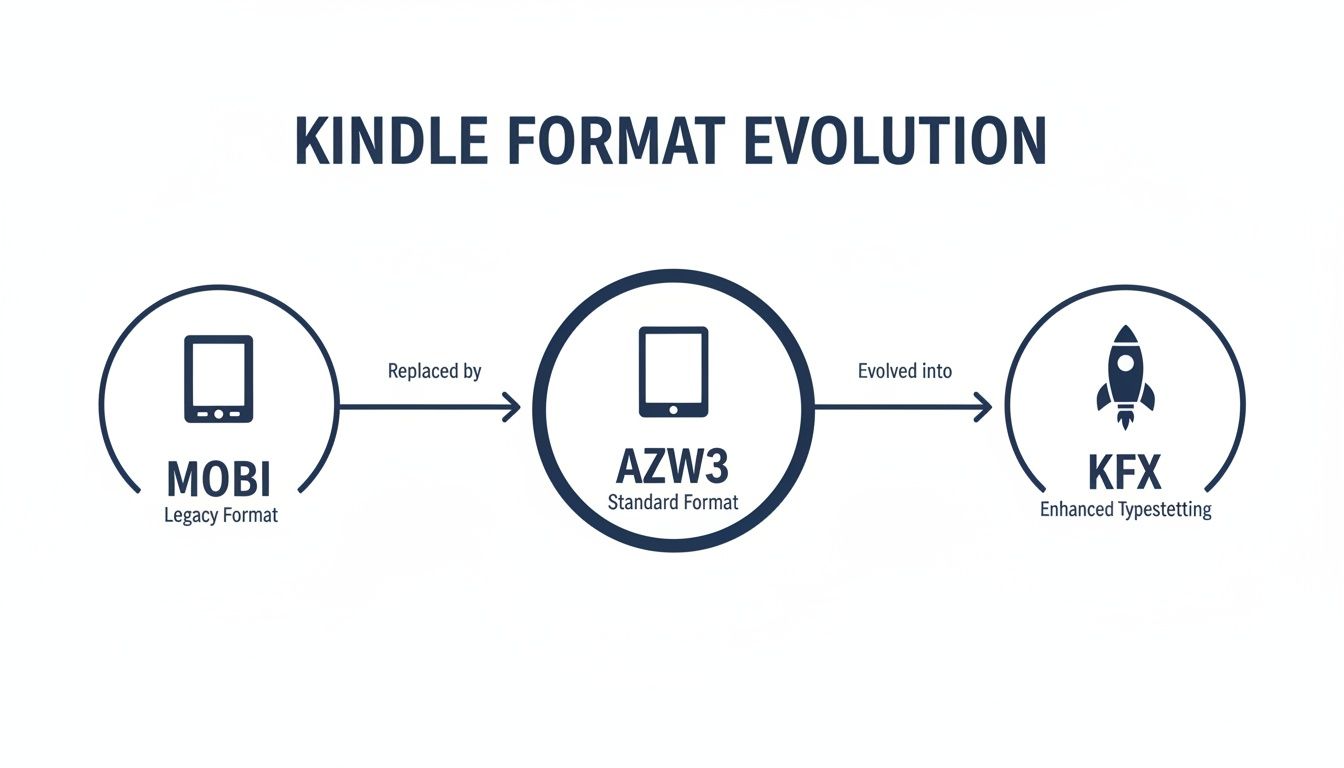
As you can see, there’s a clear progression toward more advanced formats. This is exactly why providing a high-quality source file like an EPUB is so important—it ensures the best possible conversion into KFX.
Adopting an "EPUB-first" strategy ensures your book not only looks fantastic on every Kindle but also remains adaptable for future devices and other retail platforms. It is the most robust and forward-thinking approach for any author's career.
Beyond KDP, a well-made EPUB is your ticket to everywhere else. You can use that exact same master file to publish on other major platforms like Apple Books or Kobo without starting from scratch. Think of the hours you'll save and the formatting headaches you'll avoid.
Of course, file formats are just one piece of the puzzle. It's also vital for authors to understand the entire process of how to create an ebook to sell and build their brand. Ultimately, choosing EPUB isn't just a technical decision; it's a strategic one that simplifies your life and expands your book's reach.
How to Choose the Right Upload Format for Your Book
So, you've written your book and you're ready to get it into the hands of Kindle readers. But before you hit that upload button on KDP, you have a big decision to make: which file format should you use?
This isn't just a technical detail. The file you give Amazon directly shapes how your book looks and feels to the reader. Getting it right is the first step to a professional-looking ebook. For most authors, the choice comes down to one of three: EPUB, Microsoft Word (DOCX), or Kindle Create (KPF).
Comparing Your KDP Upload Options
Each format has its own place. Think of it like this: EPUB is for the author who wants total creative control, DOCX is the straightforward path for simple, text-focused books, and Kindle Create is Amazon’s guided middle-ground.
Let's dig into what that actually means for you.
- EPUB (The Professional's Choice): This is the gold standard, hands down. If you want precise control over every heading, image, and paragraph style, EPUB is your best friend. It’s perfect for complex non-fiction with tables or any book where a custom, polished design is a must.
- DOCX (The Simple Route): Got a straightforward novel with just chapters and text? A clean Word document can work surprisingly well. KDP’s conversion engine does a decent job, but you are giving up a lot of control. For many authors, learning how to convert a Word file into a professional EPUB is the best skill they can learn to level up their publishing game.
- KPF (The Amazon-Centric Tool): Amazon's free Kindle Create software lets you add some nice visual touches like drop caps and themed title pages without needing to be a designer. The catch? The KPF file it produces is locked into the Amazon ecosystem. You can't take that file and upload it to another retailer.
Key Takeaway: If your book has any kind of special formatting or you plan to publish wide (on other platforms besides Amazon), creating a high-quality EPUB is the only way to go. For a simple fiction manuscript, a well-prepared DOCX can get the job done.
Here’s a quick guide to help you decide at a glance.
KDP Upload Format Decision Guide
| Format | Best For | Pros | Cons |
|---|---|---|---|
| EPUB | Authors seeking professional quality and multi-platform distribution. | Total design control; industry standard; works on all major retailers. | Steeper learning curve; may require specialized software. |
| DOCX | Simple, text-heavy novels (e.g., fiction) with minimal formatting. | Easy to create; no special software needed. | Very limited control over final appearance; can produce formatting errors. |
| KPF | Authors publishing exclusively on Amazon who want some enhanced formatting. | Easy to add stylish elements; free software from Amazon. | Locks you into KDP; file is not transferrable to other stores. |
Ultimately, choosing the right format gives you the best foundation for a successful book.
Making the Final Decision
Why does this matter so much? Because your format choice is tied directly to your book's market strategy and how you make money. Since the beginning, Kindle's AZW format has given authors powerful sales data through KDP's reporting.
For instance, if you price your book between $2.99 and $9.99, you're eligible for the 70% royalty rate—a huge factor in your book's profitability. Features like Kindle Edition Normalized Pages (KENP) also rely on Amazon's conversion process to make sure authors in Kindle Unlimited are paid fairly, no matter what device a reader uses. You can learn more about this on KDP's royalty information page.
This connection between your upload file, pricing, and royalties shows that picking a format isn't just a technical step; it's a critical business decision.
Avoiding Common Formatting Pitfalls
Even the most incredible story can be torpedoed by sloppy formatting. Tiny mistakes in your original document can snowball into a truly frustrating reading experience on a Kindle, and that often leads to bad reviews and lost sales. The first step to creating a professional-looking ebook is knowing what not to do.
Many of these errors come from habits we all learned using programs like Microsoft Word. What looks perfectly fine on an 8.5 x 11-inch document just doesn't translate well to the reflowable, screen-size-agnostic world of ebooks.
Let's walk through the most common tripwires and, more importantly, how you can sidestep them to make sure your book looks as polished as your writing.
The Problem with Tabs and Manual Breaks
One of the biggest culprits I see is authors using the Tab key to indent their paragraphs. It seems logical, but in an ebook, it creates a mess of unpredictable spacing that looks jagged and amateurish. Hitting the spacebar five times is just as bad.
Another classic mistake is repeatedly hitting the "Enter" key to create a manual page break to start a new chapter. On a Kindle, this can result in huge, awkward blank gaps in the middle of the text, depending on the reader's font size.
Here's the right way to handle it:
-
Problem: Using the Tab key for indents.
- Solution: Simple: just don't do it. Ever. Instead, go into the style settings of your writing software and set a first-line indent for your paragraphs. This little setting ensures every single paragraph is indented consistently and perfectly on any device.
-
Problem: Using manual page breaks for new chapters.
- Solution: Use your software’s dedicated page break or section break function. Place one right before each new chapter heading. This is the correct signal that tells the Kindle to start the chapter on a fresh screen without creating all that unwanted white space.
For a much deeper dive, our complete guide on how to format a book for Kindle breaks this down step-by-step.
Image Quality and Table of Contents Errors
Two other things that scream "amateur" to a reader are low-quality images and a broken navigation menu. Think of these as the first impression your book makes after the cover—they have to be right.
A blurry cover or a non-clickable Table of Contents immediately signals to the reader that the book was not professionally prepared. These seemingly small details have a huge impact on reader trust and their overall experience.
Problem: Using low-resolution images for your cover or interior graphics.
- Solution: Make sure every image you use is at least 300 DPI (dots per inch). This is the industry standard for high-resolution printing and digital displays. It ensures your art won't look pixelated or blurry, even on the newest high-definition Kindle screens.
Problem: Manually typing out your Table of Contents (TOC).
- Solution: Let your software do the heavy lifting! Use its built-in TOC generator. This tool automatically finds your chapter headings (if you've styled them correctly) and creates a fully interactive, clickable menu. This isn't just a nice-to-have; it's essential for a modern ebook.
Nailing these fundamentals will save you a world of headaches and negative reviews, ensuring your book looks every bit as professional as it reads.
Your Essential Pre-Publishing Checklist for KDP
You’re almost at the finish line. Hitting "publish" is exciting, but a little pre-flight check can save you a world of headaches later. Think of this checklist as your final walkthrough before sending your book out into the world.
By breaking down the process into a few key phases, you can tackle everything methodically and make sure no detail gets overlooked. It all starts with the manuscript itself.
Phase 1: Manuscript Preparation
Before you even think about file types, your manuscript needs to be absolutely rock-solid. This is the foundation for your entire ebook.
- Final Proofread: Give your manuscript one last, ruthless comb-through. Hunt down every last typo, grammar slip-up, and clunky sentence.
- Consistent Styles: Make sure your chapter titles, headings, and body text all use consistent, predefined styles (like Heading 1, Normal). This single step is the key to a clean conversion.
Phase 2: File Conversion and Assets
With your manuscript polished, it's time to get your digital files in order. This means the book file itself and its most important sales tool: the cover.
- Export a Clean File: Convert your manuscript into a validated EPUB or a perfectly formatted DOCX file.
- Cover Specifications: Double-check that your cover art meets KDP’s standards. The ideal size is 2,560 x 1,600 pixels at 300 DPI.
- Author Branding: Don't forget about your own image! Your Amazon author page is prime real estate. Getting professional AI headshots for authors can make a huge difference in how readers perceive you.
Your work isn't finished until the reader has a seamless experience. Diligently checking your file in a real-world environment is the only way to guarantee your book looks exactly as you intended on every device.
Phase 3: KDP Upload and Final Review
This is the home stretch—getting everything into the KDP dashboard and giving it one last critical look.
- Enter Metadata Correctly: This is your book's storefront sign. Carefully input your title, author name, book description, and keywords.
- Use Kindle Previewer: Once you upload your file, Amazon's Kindle Previewer is your first line of defense. Use it to spot any glaring formatting issues.
- Review on a Device: This is non-negotiable. Download the proof and test it on an actual Kindle or the Kindle app. The previewer is a fantastic tool, but it doesn't always catch everything.
Follow this roadmap, and you'll be able to publish with confidence. For a deeper dive, our complete guide on how to publish an ebook to Amazon walks you through every single step.
A Few Lingering Kindle Format Questions
Even with the basics down, a few common questions always seem to pop up. Let's tackle them head-on so you can get back to what really matters—publishing your book.
Think of this as your quick-hit guide to the most frequent points of confusion.
Can I Just Upload a PDF to KDP?
The short answer? You can, but you really, really shouldn't.
PDFs are static, like a snapshot of a printed page. They don’t have “reflowable” text, meaning the words won’t automatically adjust to fit a Kindle screen. This forces your readers into a frustrating pinch-and-zoom nightmare just to see the words.
For a professional ebook that people will love to read, always stick to a reflowable format. A well-prepared EPUB or even a clean DOCX file is the way to go.
What’s the Real Difference Between KF8 and KFX?
Let's use an analogy. Think of KF8 (also called AZW3) as the move from standard definition TV to high definition. It was a huge leap forward, bringing modern web tech like HTML5 and CSS3 to ebooks. This allowed for much more sophisticated formatting than the old MOBI files could handle.
KFX is the next step, like upgrading from HD to 4K Ultra HD. It’s all about refining the experience.
KFX is Amazon's enhanced typesetting engine. It brings in features like automatic hyphenation, smarter word spacing, and a beautifully responsive layout that looks great on any screen. The goal is a smoother, more print-book-like reading experience.
Do I Still Need to Worry About Making a MOBI File?
Nope. Put MOBI out of your mind. It’s a relic of the past.
Amazon officially stopped accepting MOBI files for new reflowable ebooks way back in 2021. The format was built for older, less capable e-readers and is now completely obsolete for authors uploading to KDP.
Your job is simple: give Amazon a great source file. A top-notch EPUB or a well-formatted DOCX is all their system needs to create the modern Kindle files for every device out there. Forget MOBI; focus on your master file.