
You've got a finished manuscript in a folder, a KDP tab open in your browser, and three decisions you keep circling. What price won't leave money on the table? Which royalty option pays more once deductions come off? And what do you change first if the book goes live and nobody finds it?
That's the core work of selling ebooks on Amazon. Uploading a file is the easy part. The money is made or lost in pricing, file size, and how candidly you read early sales data.
Ebook revenue is a sizable slice of U.S. publishing, though far from the whole market. Treat it as a baseline, not a promise. Plan around net royalty per list price after delivery fees, ad spend, and production costs come off the top. And when a book underperforms, the fix depends on the symptom: weak clicks point to packaging, weak impressions point to reach. Those are different problems with different fixes, and the sections below treat them that way.
How to Publish Your Ebook on KDP, Step by Step
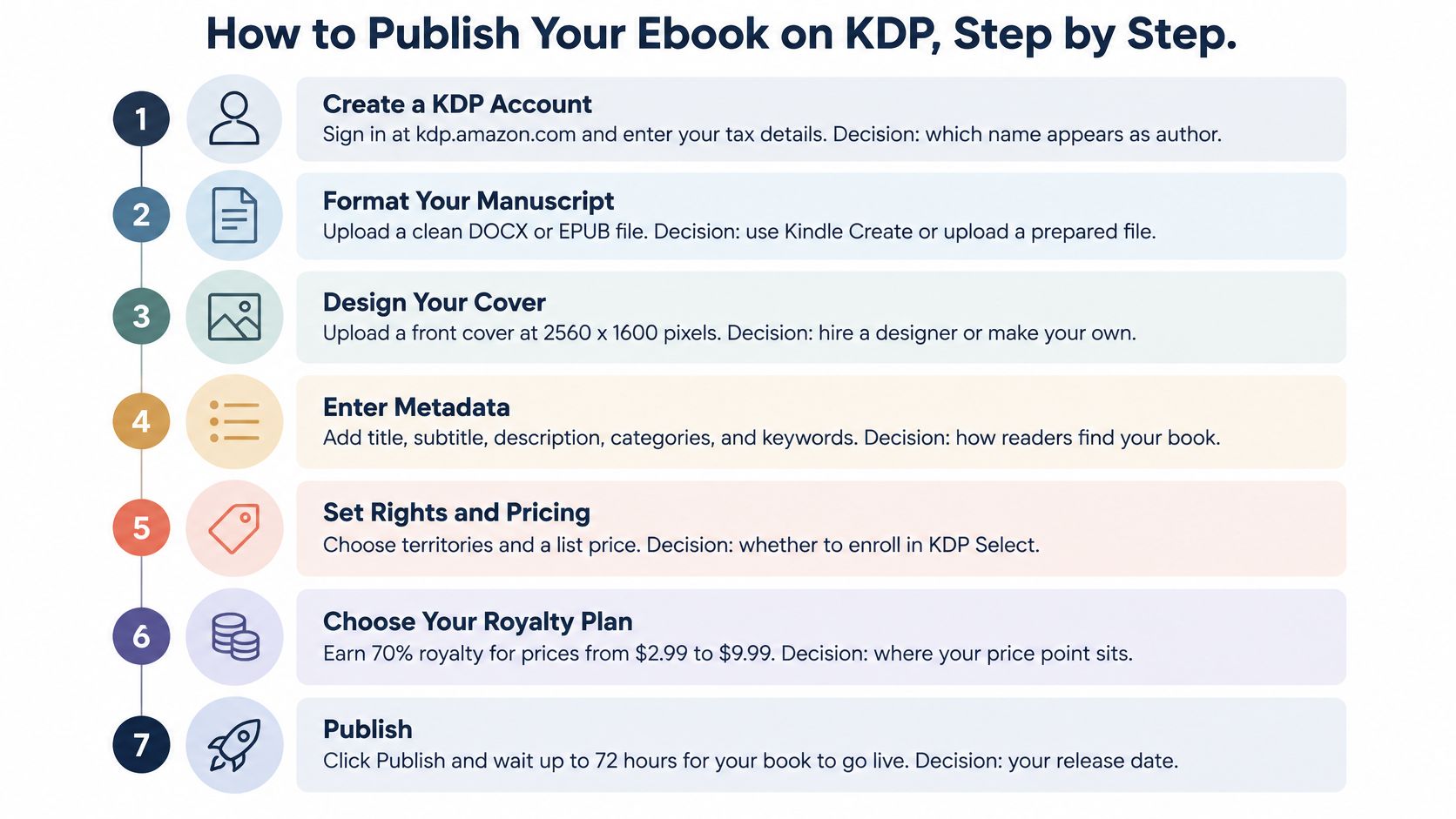
Eight steps take a finished manuscript from your hard drive to a live product page. Each one controls a decision, and some are harder to undo than others.
- Create a KDP account and complete the tax interview. U.S. based authors complete a W-9, non U.S. authors complete a W-8BEN. Nothing gets paid until Amazon has this, so do it before you schedule any launch date.
- Finish the manuscript as EPUB or DOCX and check it in Kindle Previewer. This step controls how the book reflows on phones, tablets, and e-readers. Fix chapter breaks and links here, not after readers complain.
- Prepare the cover file to ebook specs. Your cover is your ad in search results. A file that looks sharp full size but turns muddy as a thumbnail will cost you clicks.
- Enter title, subtitle, series name, contributors, and description. Type these exactly as they should appear on the product page. Contributor roles matter because they affect how editor, illustrator, or translator credits display.
- Skip the ISBN for the ebook. Ebooks don't require one, and Amazon assigns an identifier for Kindle sales. If you want an ISBN for a later print edition, KDP can assign a free one, which keeps your options open without an upfront purchase.
- Choose up to three browse categories and seven keyword phrases. These fields control where Amazon can surface the book. Pick them from reader language, not from how you'd describe the book to another writer.
- Confirm rights and decide on KDP Select enrollment. Confirm you hold the necessary rights, then make the exclusivity call deliberately. You can change price later in seconds, but Select enrollment locks distribution for a term.
- Set list prices per territory, then publish. Enter each marketplace price yourself instead of accepting a single auto conversion, because the number you type is the gross figure deductions work from. KDP review usually takes up to 72 hours, so publish ahead of any announced date.
What success looks like on day one
You're done when three things are true. The product page is live, the preview opens cleanly in the reader, and the book appears in search for its own title. If any of those fail, fix the file or metadata before you send traffic.
KDP can support serious income, but results concentrate. A small share of titles earns most of the royalties on the platform, and the gap between those books and the rest rarely comes down to the upload itself. It comes down to packaging that earns the click and pricing that survives deductions. Get both right before the book goes live, because fixing them after launch costs you the early visibility window when Amazon is still deciding how to rank you.
File and Cover Specs That Pass KDP Review
Files usually fail for practical reasons. The manuscript breaks on a phone, the cover can't be read as a thumbnail, or the file is heavy enough to tax every sale. Fix those three problems before upload and most review trouble disappears.
Your ebook cover should be 2560 x 1600 pixels at a 1.6 to 1 ratio. Design at full size, then shrink it to about 150 pixels wide and read the title out loud. If you have to squint, a shopper scrolling on a phone won't stop.
Design for the thumbnail first and the product page second. The click happens at small size, the purchase happens later.
Manuscript requirements that affect money
Upload EPUB or DOCX and stay well under the 650 MB limit. That ceiling isn't your target. On the 70% royalty option, Amazon deducts a delivery cost tied to file size, so each extra megabyte reduces what you keep on every sale.
Build navigation properly. Use a linked table of contents, real chapter breaks instead of strings of blank lines, and test every internal link. Blank line spacing collapses unpredictably across devices and leaves chapters running together.
- Compress every interior image. Size images for screens, not for print output.
- Remove decorative bulk. A repeated full page graphic that adds no reader value still adds delivery cost.
- Check image heavy chapters twice. Illustrated nonfiction and children's books feel file weight fastest.
| Element | Requirement | Common mistake |
|---|---|---|
| Ebook cover | 2560 x 1600 px, 1.6 to 1 ratio, readable at thumbnail size | Title text unreadable at thumbnail size |
| Manuscript file | EPUB or DOCX, well under 650 MB | Print PDF uploaded as an ebook |
| Table of contents | Linked chapter headings | Chapters that are not navigable |
| Interior images | Compressed, sized for screens | Oversized images that raise delivery cost |
| Preview check | Kindle Previewer on phone view | Layout breaks visible only on small screens |
Run a full Kindle Previewer pass in a phone sized view before you publish. Tap the table of contents, jump to the last chapter, enlarge the font, and return through any notes or links. Desktop views hide the breaks readers hit.
Don't upload a print PDF as an ebook. Fixed pages force pinch and zoom reading, text can't reflow, and font controls stop working as readers expect. If your book started as a print layout, rebuild it as a reflowable EPUB or DOCX instead of reusing that file.
Royalty Rates and Net Earnings by List Price
Start with net pay for a U.S. sale of a 1 MB file with no sales tax applied. These figures show why headline percentages mislead.
| List price (USD) | Royalty option | Royalty per sale | What it means |
|---|---|---|---|
| $0.99 | 35% | $0.35 | Below the $2.99 floor, so 70% is unavailable |
| $2.99 | 70% | $1.94 | Lowest price on the 70% tier, delivery cost comes off |
| $4.99 | 70% | $3.34 | Common price point for novels in the 70% band |
| $9.99 | 70% | $6.84 | Top of the 70% band, delivery cost still applies |
| $10.99 | 35% | $3.85 | Moving just above $9.99 drops the rate to 35% |
| $12.99 | 35% | $4.55 | Typical for long nonfiction or illustrated titles |
The two deductions you control
Amazon states that the 70% option deducts applicable VAT and delivery costs, while sales outside eligible 70% territories generally receive 35%, and the 35% option is calculated on list price excluding VAT without the same delivery deduction in KDP ebook pricing and royalty guidance. Delivery runs at roughly $0.15 per MB. A 1 MB novel loses about $0.15 per sale. A 5 MB file loses about $0.75.
That difference compounds with illustrated books. A $4.99 illustrated guide at 12 MB earns about $1.69 per sale at 70%, because $3.49 minus $1.80 in delivery leaves $1.69. A $4.99 novel at 1 MB earns about $3.34 at the same price. Same tier, same list price, very different net.
Practical rule: Maximizing the advertised royalty percentage isn't always the same as maximizing global earnings.
Two decision rules worth using
Price can beat tier. A higher price at 35% beats a lower price at 70% when the numbers cross. Here, $10.99 at 35% returns about $3.85, against $3.34 for $4.99 at 70% with a 1 MB file. That only works if readers in your category will pay $10.99 without a sharp conversion drop.
File size can beat price. Cutting that 12 MB guide to 4 MB raises net by about $1.20 per sale through delivery savings alone. That's more than a $1 price rise adds on the 35% tier, and it doesn't ask readers to pay extra. Compress images before you raise price to fix thin margins.
Check territory prices before you publish. VAT treatment, price matching, and whether a market qualifies for 70% all change the payout, so a U.S. price that looks optimal can produce a materially different royalty in Europe or elsewhere.
Metadata and Categories That Help Readers Find You
Take a cozy mystery set in a bakery. Putting it in a broad mystery category with keyword phrases like "mystery book" buries it under thrillers, police procedurals, and true crime. Putting it in the cozy subgenre with phrases like cozy mystery bakery tells the right readers, and Amazon, exactly where it belongs.
Readers browse and search with specific language, often on a phone or tablet between other tasks.

Metadata is the only discovery lever you fully control before launch, and it works with your cover and opening pages. Weak categories limit reach no matter how good the book is. Strong categories with a weak cover still lose the click.
Title, subtitle, and description
Keep the title as the actual name readers will search for, recommend, and type correctly. Use the subtitle for the promise, such as a genre cue in fiction or a clear outcome in nonfiction. Don't stuff the title with claims that make it hard to say out loud.
Write the description as sales copy. Lead with a clear first line, name the reader problem or story hook, add a short proof point, and break the text into readable chunks. Long unbroken blocks get skipped, especially on mobile.
This walkthrough shows how listing fields come together in practice.
Choose three narrow, accurate browse categories where your book can credibly compete near the top of the list. Fill seven keyword phrases with searches a reader would type, not single generic words. Then check competing titles on their product pages, note their category paths and phrasing patterns, and revisit your metadata after launch when you have click and conversion data. For a deeper treatment of search language, see book search engine optimization and apply the same reader phrase test to every field.
Choosing Between KDP Select and Going Wide
The core trade-off is Kindle Unlimited reach inside Amazon against sales freedom everywhere else.
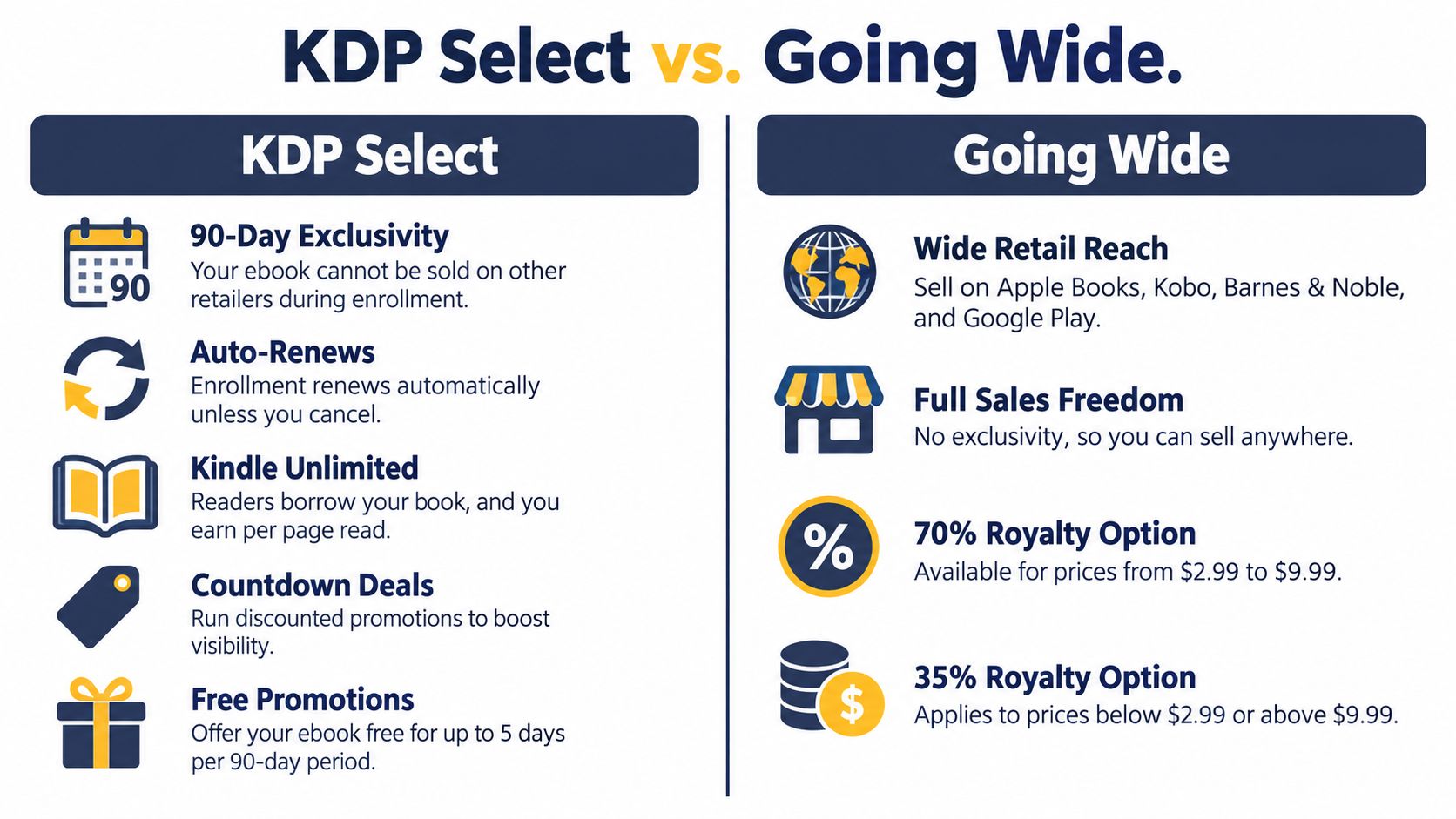
KDP Select requires 90 day exclusivity for the ebook and auto-renews unless you cancel. In return, you get Kindle Unlimited access, Kindle Countdown Deals, and up to five free days in each 90 day period. You can't sell that ebook on other retailers or your own site during enrollment.
Kindle Unlimited doesn't pay per copy sold. It pays per page read from a shared pool, so earnings vary by month and depend on how far readers get. A long book that readers abandon early can underperform a shorter book they finish.
Going wide means selling through Apple Books, Kobo, Barnes & Noble, and Google Play, plus your own site if you want it. You give up Kindle Unlimited page reads and Select promotions. In exchange, you aren't dependent on one store and you can reach readers who don't buy Kindle books, including customers starting with a Barnes and Noble ebook purchase.
| Factor | KDP Select (exclusive) | Wide distribution |
|---|---|---|
| Exclusivity | Kindle only for 90 day terms, auto-renews | No exclusivity, sold on several retailers |
| Kindle Unlimited | Enrolled, earns per page read from the KU pool | Not in KU, earns per sale |
| Promotions | Kindle Countdown Deals and up to 5 free days per 90 days | Price changes and retailer promotions only |
| Best fit | Fast read genre fiction, new series | Nonfiction, reference, audiences already on other platforms |
Verdict by situation
A first book in a fast read genre such as romance or thriller usually benefits from Select. Borrowers can try an unknown author with less friction, page reads create revenue while reviews build, and a series gives those readers somewhere to go next.
A nonfiction or reference title with buyers already on other platforms usually does better wide. Professionals, libraries, and international readers don't all shop in the Kindle Store, and direct or retailer diversity matters more than page reads for many reference purchases.
If you're truly unsure, test candidly. Run one 90 day Select window, record sales, page reads, and promotion results in KDP Reports, then compare that baseline with a wide period. Don't judge either route by a single launch week spike.
Tracking Sales and Fixing Weak Discoverability
Start with the earliest symptom, few impressions. If Amazon rarely shows the book, you have a reach problem, and redesigning the cover won't fix it.
Researchers studying Amazon's role in publishing have described the store as a gatekeeper whose recommendation system is opaque and weighs sales and review signals heavily in research on Amazon as a publishing gatekeeper. Treat that as context, not a formula. You can't control rankings inside that system. You can measure the chain you influence.
| Symptom | Likely cause | First check |
|---|---|---|
| Few impressions | Weak keywords or wrong categories | Keyword phrases and browse categories |
| Impressions but few clicks | Cover or title not competitive at thumbnail size | Cover at thumbnail size and title in search results |
| Clicks but few sample reads | Description or opening pages not hooking | First page and description opening line |
| Samples read but few purchases | Price or positioning mismatch | Price against top titles in the same category |
| Sales but no reviews | No review path after reading | Back matter review request and reader list |
Read the funnel in order
Split tracking between two dashboards, because neither shows the whole funnel. The Amazon Ads dashboard reports impressions, click-through rate, and ad-attributed sales. KDP Reports covers what happens after a click becomes revenue: units sold, KENP page reads, and estimated royalties. Sample downloads aren't reported in either, so treat that stage as an estimate based on how sales respond after you change the description or opening pages.
A practical guide to how to track book sales helps you keep those numbers in one routine instead of checking royalty totals in isolation. Track net royalty per sale alongside units moved. A price change that costs a few conversions can still raise what each sale pays you.
- Low impressions: Fix keyword relevance and category accuracy first. Also check for genre mismatch, because Amazon can't recommend a book confidently if its signals point to two different audiences.
- Healthy impressions, low clicks: Test the cover at thumbnail size against the top titles beside it in search. Title clarity and genre signaling usually matter more here than fine design detail.
- Clicks, weak samples: Rewrite the opening line of the description and inspect the first page. Readers are interested enough to arrive, then unconvinced they should start.
- Samples read, purchases lag: Compare price, length, and positioning with leading titles in the same category. Readers liked the start but didn't accept the value exchange.
- Sales, no reviews: Add a direct review request in the back matter and invite readers onto a mailing list. Don't buy reviews or trade them, just remove friction for honest ones.
Don't advertise a conversion problem. Paid reach sent to a page that doesn't convert only buys clearer evidence that the packaging isn't working.
Separate weak reach from weak conversion before you spend. Reach problems call for better metadata, category fit, and early sales velocity. Conversion problems call for cover, sample, description, or price work.
Launch Plan and Pre-Publish Gate
Do one thing today. Confirm the four decisions that aren't cheap to change after publishing.
- File format and size: Reflowable EPUB or DOCX, compressed images, clean phone preview.
- List price: Checked against the royalty bands and delivery cost, territory by territory.
- Categories and keywords: Three accurate categories and seven reader typed phrases.
- Distribution route: KDP Select enrollment or wide release, chosen on purpose.
Don't reopen these decisions every day once the book is live. Publish, then use the first 30 days of data to adjust one variable at a time. Constant changes make your own results impossible to read.
In launch week, email your existing list with a direct link and post in reader communities where your genre is discussed. Use the book's actual hook from its description, not a generic new release announcement. Hold any Countdown Deal until you have a few weeks of KDP Reports data, so you know whether you need more reach or better conversion.
A readable first month beats a noisy launch week. Work down the symptom table, fix the earliest broken stage, and give each change time to produce evidence. If you still need editing, cover design, interior layout, or ISBN handling before upload, BarkerBooks is one option that provides those publishing services before you complete the gate.
If you're ready to publish but need professional editing, cover design, formatting, and Amazon distribution handled as one coordinated process, BarkerBooks offers publishing packages that take your manuscript from final draft to a live ebook listing. Visit BarkerBooks to review the services and choose the level of support that fits your book and timeline.