
Your manuscript is finished, the chapters are edited, and now you're staring at a blank cover file wondering whether a polished template is enough. That decision matters because online readers often meet your book as a small front-cover image inside a crowded store page, search result, or recommendation feed.
Book cover design online isn't one decision about software. It's a decision about control, time, cost, and commercial risk. You can build the cover yourself, customize a template, or hire a professional. The right choice depends less on which tool looks easiest and more on how much judgment, testing, and production responsibility you're prepared to handle.
The Cover Decision Every Author Faces
Book covers became distinct publishing elements in the early nineteenth century, first supporting the title page and later taking over many of its identification and marketing functions. Ebook distribution changed that job. Digital editions generally show the front cover without the physical spine and back cover, so the cover must communicate inside store pages, search results, recommendation feeds, and metadata-rich listings. Historical research on digital book covers describes the online cover as a visual portal to a webpage of metadata, not a complete physical package.
That shift gives you three viable paths:
- DIY design tools, such as Canva, Adobe Express, and BookBrush. You keep maximum control and reduce cash expense, but you take responsibility for concept, typography, image licensing, accessibility, and final files.
- Template marketplaces and services, which give you a genre-oriented starting point. You move faster, but your cover may resemble other books using the same design system.
- A professional designer or publishing service, which costs more in money and coordination, but buys you visual judgment, genre fluency, original art direction, and production accountability.
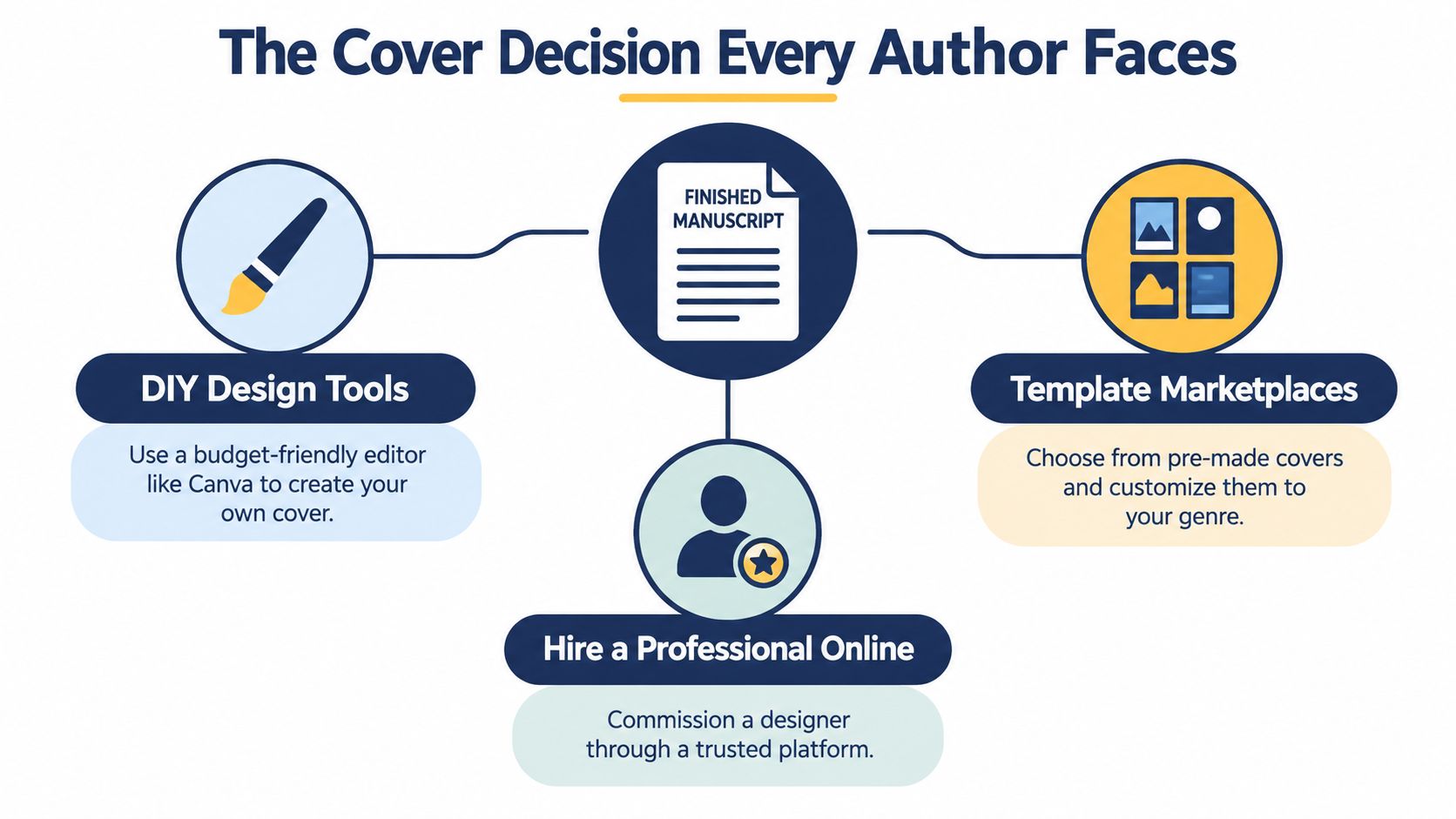
The first question isn't “Which app should I open?” Ask instead: What can I afford to control, and what can I afford to get wrong? A DIY cover may save money while consuming evenings in font selection, image editing, revisions, and file preparation. A template can shorten the design process while limiting originality. A professional can reduce production risk, but only if you provide a clear brief and assess the portfolio properly.
Practical rule: Choose the path before choosing the tool. Your format, genre, deadline, and design experience should determine the workflow.
Online bookstores make the decision thumbnail-first. Readers may see your cover before they read the description or open a sample, so the title, author name, genre signal, focal image, and contrast must survive a small display. The rest of this guide treats cover design as a practical trade-off, not a software roundup.
DIY Tools, Template Services, and Professional Designers
The three routes are not equal options. They trade budget for control, and each places creative and technical risk in a different set of hands.
| Path | Typical cost | Time to first draft | Best for |
|---|---|---|---|
| DIY design tools | Lowest cash outlay, with substantial time required | Fast to variable | Authors with visual confidence, simple concepts, and strong control needs |
| Template services | Paid template or customization fee | Usually fast | Authors who want a genre-aware starting point without commissioning original art |
| Professional designers | Higher fee, based on scope and deliverables | Variable, often longer than templates | Authors who need custom art direction, series consistency, or publishing support |
A DIY cover keeps decisions and files under your control, but you also carry the responsibility for typography, image rights, revisions, and final exports. Templates reduce the time spent building a layout from scratch. Professional design costs more and gives you less direct control over each design decision, while adding experienced judgment and production accountability.
DIY tools
Canva, Adobe Express, and BookBrush let authors combine typography, stock imagery, shapes, and color palettes without advanced design software. Use them for straightforward nonfiction, type-led concepts, or projects where you understand spacing, hierarchy, contrast, and image licensing.
Access to a tool does not provide design judgment. Software can align text, but it cannot decide whether the title disappears against a busy background. It can suggest decorative fonts, but it will not recognize that an ornamental script weakens a thriller's authority or vanishes in a thumbnail. DIY is the right choice only when you can make those calls deliberately, test several layouts, and discard a polished-looking first attempt.
Template services
Reedsy resources, Book Cover Zone, and premade-cover marketplaces provide an established visual structure. You can often change the title, author name, colors, and imagery while retaining a layout that communicates a familiar genre.
The compromise is originality. A template may signal romance, mystery, fantasy, or self-help quickly, yet similar covers may sit beside yours in an online store. Review the license before purchase. Confirm whether the design is exclusive, identify the permitted uses, and ask which files you will receive. Choose a template when speed and a controlled budget matter more than a fully original concept, particularly for a modest project or an early experiment.
A strong cover also creates a visual sequence in an instant. Advice on how to boost engagement with visual stories can help you connect the focal image, emotional tone, and reader's first impression instead of treating the artwork as decoration.
Professional designers
A professional earns the fee through judgment, not software access. They interpret your brief, find the manuscript's strongest visual promise, select or direct imagery, establish hierarchy, test the design at small sizes, and prepare the required exports. For a series, the designer can create a repeatable visual system so every book belongs to the same product line.
Freelance marketplaces such as Fiverr and Upwork sit between template work and full publishing support. Capable designers are available, but portfolios, rights terms, revision policies, and production standards vary sharply. Do not hire from one attractive mockup. Request genre-relevant examples, a thumbnail view, source-file terms, and evidence that the designer can prepare both ebook fronts and print wraps.
For authors who want broader publishing support, BarkerBooks' book cover design programs offer another professional-service route. The decision is straightforward: choose DIY for maximum control, templates for speed and a lower cash outlay, and professional design for original art direction, series consistency, and production responsibility.
What Reader Research Says About What Works
Cover design is subjective, but reader preference can still inform decisions. A 2024 study of consumer preferences for visual elements in bestseller-novel covers reported stronger preference for bright, warm, romantic, or fresh palettes, along with realistic and artistic image-based illustrations in prominent areas. The study's publication record supports a practical conclusion: color and prominent imagery are testable components, not merely expressions of personal taste.
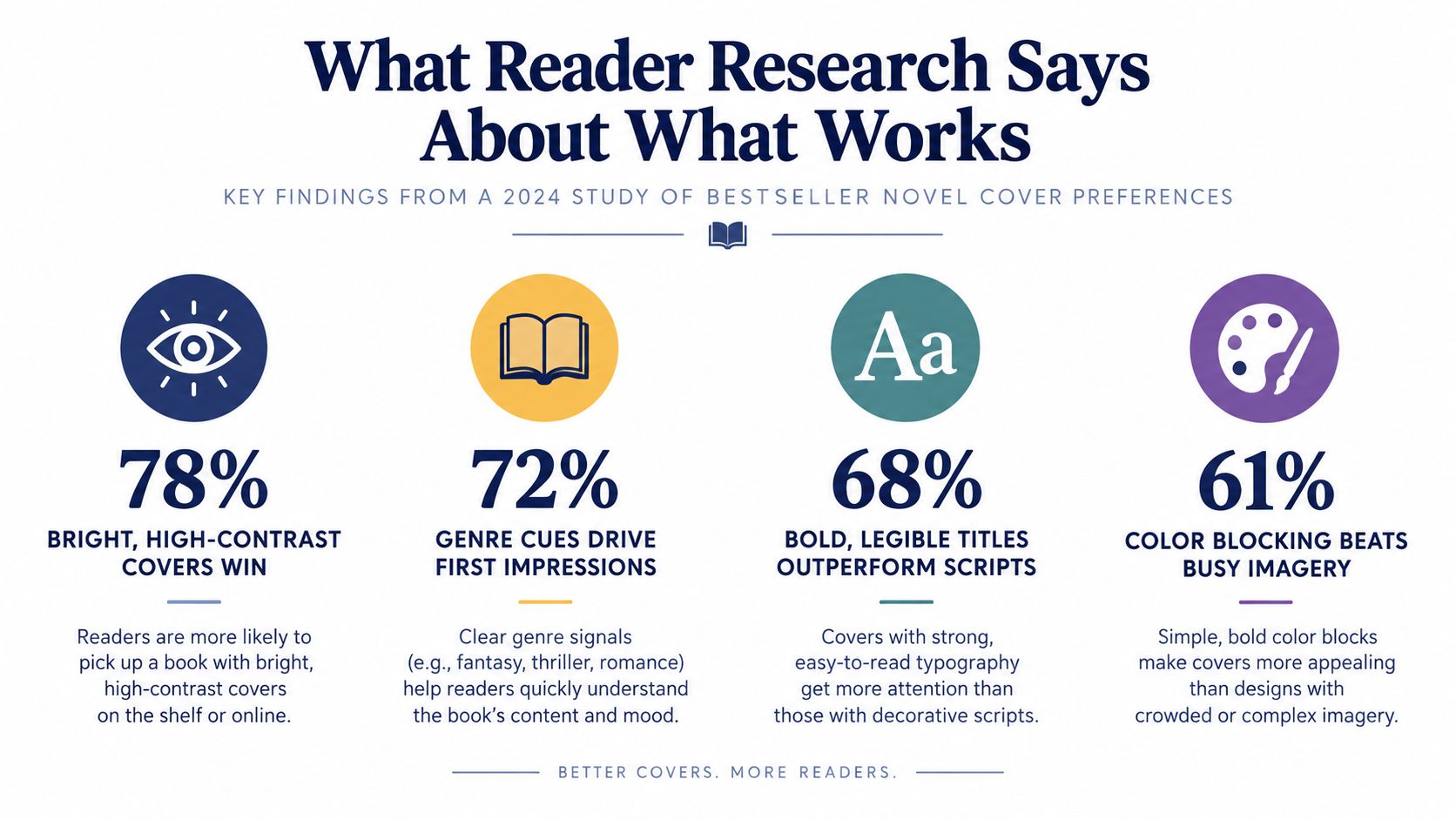
The evidence doesn't create one universal cover formula. Bright warmth may suit romance, lifestyle, or contemporary fiction, while mystery, historical fiction, literary fiction, or business books may require darker palettes, restraint, or more conceptual imagery. Genre communication still outranks a designer's favorite color.
Test the cover in the order readers encounter it
Start with the thumbnail, not the full-screen file. Reduce the cover until the title, author name, focal image, and broad color arrangement resemble the small display readers see while browsing. If the image turns into an undifferentiated block or the title loses its shape, revise the design before polishing details.
Use controlled alternatives rather than asking friends which cover they “like.” Create versions that change one major variable at a time:
- Palette temperature, such as warm versus cool.
- Image treatment, such as realistic photography versus illustration.
- Title placement, such as top, center, or lower third.
- Focal-area emphasis, such as a single object, character, setting, or type-led treatment.
Show those versions to readers who regularly choose books in your genre. Ask what genre they expect, what mood they perceive, and which title they can read first. Their answers reveal communication problems that personal taste often hides.
Keep fine detail secondary
Online browsing rewards immediate recognition. A complex scene may look impressive at full size but collapse when compressed. Strong color blocking, one dominant focal idea, and clear typography usually give the cover a better chance of remaining identifiable in a feed.
The research supports testing rather than imitation. Don't copy a bestseller's exact layout. Identify which visual elements carry the genre and emotional promise, then execute them in a way that belongs to your book.
Files, Dimensions, and the Hand-Off Checklist
A beautiful concept can still fail at publication if the designer hands over the wrong file. Treat the cover as a set of format-specific deliverables, not one image that gets stretched everywhere.
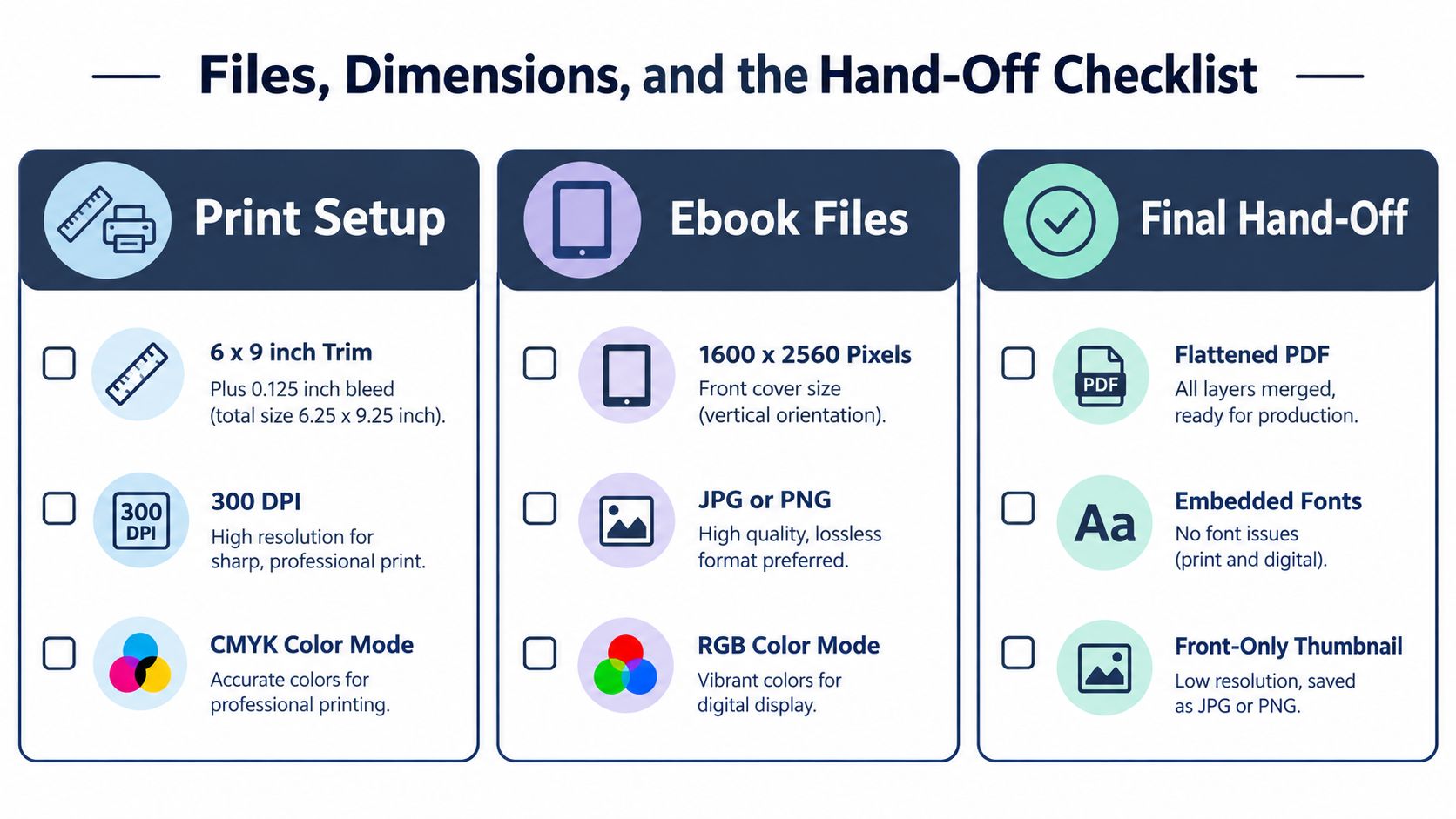
Print and ebook editions have different technical needs. A paperback wrap includes the front, spine, and back, while an ebook generally needs a front-only image. Print production also requires bleed, resolution, and a CMYK workflow. Ebook storefronts need a clean RGB front cover at screen dimensions. Don't ask one flattened JPEG to do both jobs.
Build separate deliverables
For a standard print workflow, prepare a 6 by 9 inch trim size with bleed, 300 DPI, and CMYK color mode. Confirm the printer's bleed specification and spine calculation before finalizing the wrap. The BarkerBooks paperback dimensions guide is a useful reference when you're checking trim and production requirements.
For an ebook front cover, prepare at least 1600 by 2560 pixels, using JPEG or PNG in RGB. Store requirements can change, so check the current specifications for the retailer where you'll publish. Apple Books, for example, requires an sRGB workflow for its cover assets, so don't assume a print-ready CMYK file can be uploaded unchanged.
Production rule: A designer who sends only a 72-DPI JPEG hasn't completed the hand-off. You need usable exports and the working file or agreed source-file equivalent.
Use this hand-off checklist
- Print wrap: Front, spine, and back in a flattened PDF, with bleed and embedded fonts.
- Ebook front: Front-only JPEG or PNG in RGB, sized for online display.
- Editable source: Working file with linked or embedded assets, subject to your contract.
- Font rights: Confirm that every typeface is licensed for the intended use.
- Image rights: Keep records for stock, commissioned, or generated imagery.
- Thumbnail proof: Save a front-only version and inspect it at mobile-shopping size.
- Audiobook version: Confirm the platform's square-cover requirements separately.
- Promotion files: Request appropriately cropped assets for social posts and advertising.
Promotional graphics create another production context. If you're adapting the cover for Stories or paid social placements, consult a resource covering video settings for Instagram ads before exporting campaign assets. The cover should remain recognizable after cropping, but the ad file shouldn't replace the publication master.
Thumbnail Accessibility and Inclusive Cover Design
Accessibility is a discoverability issue, not a decorative extra. Online bookstores reduce covers to small images, and low-contrast lettering, intricate artwork, or color-dependent meaning can disappear before a reader understands the title.
A 2025 analysis of 100 highly rated queer-romance titles found that many covers failed WCAG color-contrast requirements even though most were colorblind-safe. The published analysis concluded that relatively small changes to contrast, palette, and typography could improve accessibility without stripping away genre identity.
Run a thumbnail accessibility check
Use a repeatable pass before publication:
- Check contrast: Test title and author text against the actual background, not a blank color sample.
- Inspect type clarity: Reduce the cover until you can still identify the title without zooming.
- Simulate color-vision differences: Confirm that the focal image and hierarchy don't depend on one color distinction.
- Review mobile size: Open the cover on a phone and inspect it in a store-like viewing context.
- Test bilingual versions: Longer words, diacritics, and multiple scripts need room, consistent weight, and deliberate line breaks.
A stronger contrast value doesn't require a dull cover. You can darken an image beneath the title, move text into a calmer area, add a restrained overlay, or choose a typeface with thicker strokes. The goal is to preserve the emotional and genre signal while making the information easier to perceive.
This matters for international readers as well as readers with visual disabilities. A cover that remains readable across languages, scripts, and screen conditions has a clearer chance of being recognized during browsing. The practical principles in what makes a good book cover become more useful when you apply them at thumbnail scale rather than only on a large design canvas.
AI-Assisted Covers Without the Hype
The useful question isn't whether AI is good or bad. It's where AI belongs in the workflow and who checks the result.
Industry data reports that 57% of surveyed creators design their own covers and 68% edit their own work. The Lulu 2025 Books and Business Insights Report places AI inside an already self-directed creator workflow. For many authors, the tool won't replace a publishing-house pipeline. It will influence brainstorming, image sourcing, and DIY experimentation.
A 2025 peer-reviewed study summarized in the same available coverage found that participants preferred unlabeled AI-generated art in a controlled comparison, while detection accuracy sat around 53% to 55%. That finding complicates two assumptions: readers can't necessarily identify AI imagery reliably, and stated objections don't automatically predict purchasing behavior.
Use AI as an assistant, not an art director
A risk-aware workflow looks like this:
- Generate concepts, not final trust. Use AI for mood boards, composition prompts, palette exploration, or visual metaphors. Treat every output as a draft.
- Verify rights and terms. Review the generator's commercial-use rules and your platform obligations. Keep a record of prompts, source assets, and edits.
- Inspect technical errors. Check hands, faces, text, perspective, lighting, architecture, and repeated objects. AI can produce attractive mistakes that become obvious on a cover.
- Check cultural accuracy. Generic systems can flatten clothing, symbols, locations, and identities into stereotypes. Bilingual and international authors should use informed human review for culturally specific imagery.
- Test the thumbnail. A technically impressive image still fails if the title disappears or the genre becomes ambiguous at small size.
- Disclose material involvement when appropriate. Follow the relevant platform, distributor, publisher, and contractual expectations. Transparency is a workflow decision, not a substitute for quality control.
The final cover must still communicate the book accurately. A human designer can use AI output as raw material, but should edit, art-direct, and reject it when it introduces legal, cultural, anatomical, or genre risks.
How to Read a Designer's Portfolio Before You Hire
A strong portfolio should help you predict the cover's performance, not just confirm that the designer can make attractive images. Review it as an author choosing a production partner.
Start with genre evidence. For a cozy mystery, inspect covers that communicate that reading experience through typography, color, imagery, and composition. Attractive design is not enough. The designer should understand the category's visual signals, then use them with enough originality to avoid looking interchangeable.
Check promising work at thumbnail size. Save a few examples, reduce them, and ask three practical questions: Can you read the title? Can you identify the genre? Does the cover remain distinct beside competing retailer thumbnails? If the design works only at portfolio scale, it is not ready for Amazon or Apple Books.
Look for range within the same category, too. A designer should be able to create different solutions for different authors while maintaining clear genre communication. Series covers deserve special attention. Compare several books from one series and check whether the typography, placement, color logic, and imagery form a recognizable family.
Ask for commercial proof
Before signing, get precise answers about:
- Concept scope: How many initial directions are included?
- Revisions: What qualifies as a revision, and how many rounds are covered?
- Deliverables: Will you receive ebook, print, audiobook, and promotional versions?
- Source files: Are editable files included, or only flattened exports?
- Rights: Who owns the final artwork, and what licenses cover stock or generated elements?
- Series work: Can the designer preserve visual continuity across later books?
- Production: Does the designer check bleed, color mode, resolution, and retailer requirements?
A small paid test can make sense if the designer offers it transparently. Use it to assess communication, interpretation of your direction, visual hierarchy, and revision behavior. Do not request a complete publishable cover as unpaid speculative work.
Red flags include generic portfolios, unclear image licenses, unlimited-revision promises without a defined process, refusal to show thumbnail proofs, and vague delivery terms. A low quote can become expensive when another designer must rebuild the files for publication. Ask to see the production-ready hand-off before you commit.
How BarkerBooks Approaches Cover Design
An author who wants one team handling the cover and publishing setup may prefer BarkerBooks over separate vendors. BarkerBooks provides professional cover design for print and ebook editions, with packages ranging from Essential to Elite. It reports having published more than 7,500 authors and holding a 4.9 Google average rating, with distribution through Amazon Kindle, Apple Books, Barnes & Noble, and Google Books.
The strongest case for an integrated service is coordination. Cover concepts, interior formatting, ISBN work, and distribution preparation can be handled within one workflow rather than passed between disconnected vendors. That can simplify production when a book needs an ebook front cover, a complete print wrap, consistent editions for several markets, or a bilingual design with demanding typographic requirements.
The trade-off is control. Authors who want to direct every design decision may prefer a specialist designer or DIY process. Authors who want professional execution with publishing support may find BarkerBooks a practical fit. Before choosing a package, confirm its concept process, revision limits, file formats, rights, delivery schedule, platform preparation, and included services.
Review BarkerBooks alongside other providers, then choose the path that matches your budget, involvement, and production needs. A strong online cover must remain clear at thumbnail size and arrive ready for publication.