
A long audiobook magnifies small mistakes. A slightly noisy room becomes distracting across every chapter, an inconsistent character voice becomes difficult to repair later, and a poor file-naming habit can turn delivery into a confusing pile of exports. Indie authors and DIY narrators often discover these problems only after they've invested substantial time in recording.
The strongest results come from treating production as a connected workflow rather than a collection of microphone tricks. Prepare the manuscript before opening the recording software, establish a controlled acoustic setup, record with repeatable technique, protect vocal consistency, edit conservatively, meet platform specifications, proof every chapter, and make an honest decision about whether professional narration will save time and improve the final product. These eight audiobook recording tips follow that sequence from first preparation through release-ready delivery.
1. Invest in Quality Recording Equipment and Acoustics
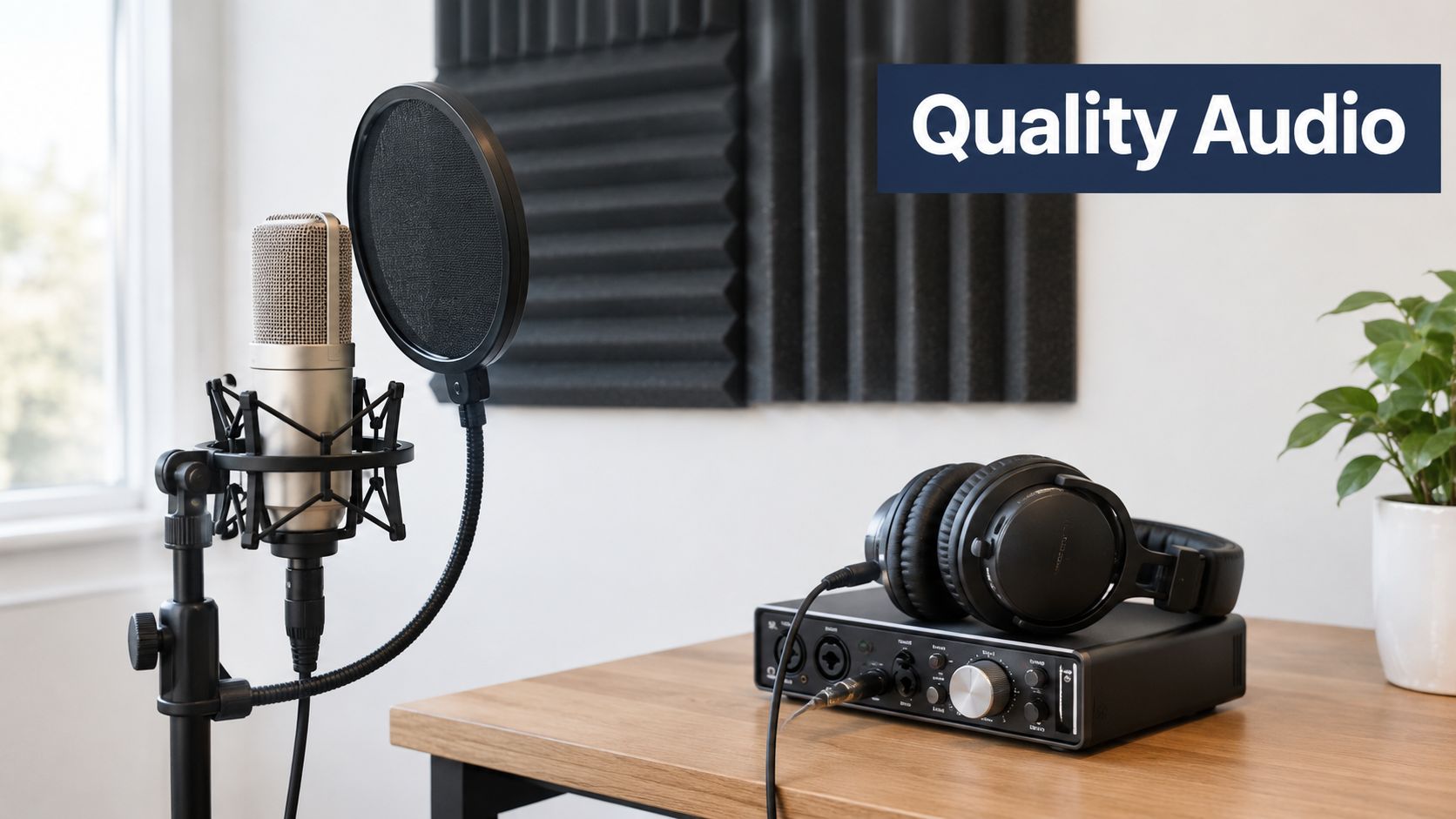
A recording session can fail before the first page is read. A costly microphone in a reflective room captures echoes, computer fans, HVAC noise, and movement. A sensible microphone in a quiet, controlled space usually produces a more usable audiobook, with fewer distractions to repair during editing.
Set up the room before choosing the final recording chain. A closet or small bedroom can work when blankets, rugs, thick curtains, or acoustic panels reduce hard reflections. Keep the microphone away from vents, windows, refrigerators, and noisy computers. Foam may reduce some reflections, but it will not silence a loud room. Address the largest noise sources first, then record a short room-tone sample so you can check whether the space stays consistent.
Build the setup around repeatability
Choose a microphone that suits your room and voice, not just the most expensive model available. An Audio-Technica AT2020 or Blue Yeti can suit a controlled home setup, while a Neumann U87 makes more sense in a properly treated professional environment. A quality audio interface, such as a Focusrite Scarlett or PreSonus model, can provide cleaner, more predictable input than an improvised connection.
Use closed-back headphones during recording. They let you catch hum, clicks, mouth noise, and distortion before those faults spread through a chapter. Record short tests from several distances and angles, then select the position that gives you a clear voice without excessive room sound or plosives. Save that setup as a repeatable template, including the input, headphones, room, project folder, and test process. This structure also helps you build a scalable podcast workflow, although audiobook sessions require stricter consistency because listeners spend much longer with the voice.
Practical rule: Judge a setup by whether a short test sounds quiet, clear, natural, and repeatable the next day. Its appearance matters less than its recorded result.
ACX recommends beginning with a short, high-quality sample and using a quiet recording space, so test the complete chain before committing to a full session. Its production guidance indicates that new narrators commonly need 5 to 7 hours to record 1 finished hour, with performers averaging about 9,300 words per hour. A 70,000-word manuscript can therefore require roughly 7.5 hours of narrated performance time before editing, plus time for retakes, room tone, and proofing. Review the ACX production guidance for audiobook recording when planning the schedule.
2. Master Proper Microphone Technique and Positioning
Your microphone position should become part of your performance routine. Moving closer for one emotional line and farther away for the next changes volume, bass response, room sound, and plosive behavior. Those variations make editing harder and can leave listeners adjusting their volume repeatedly.
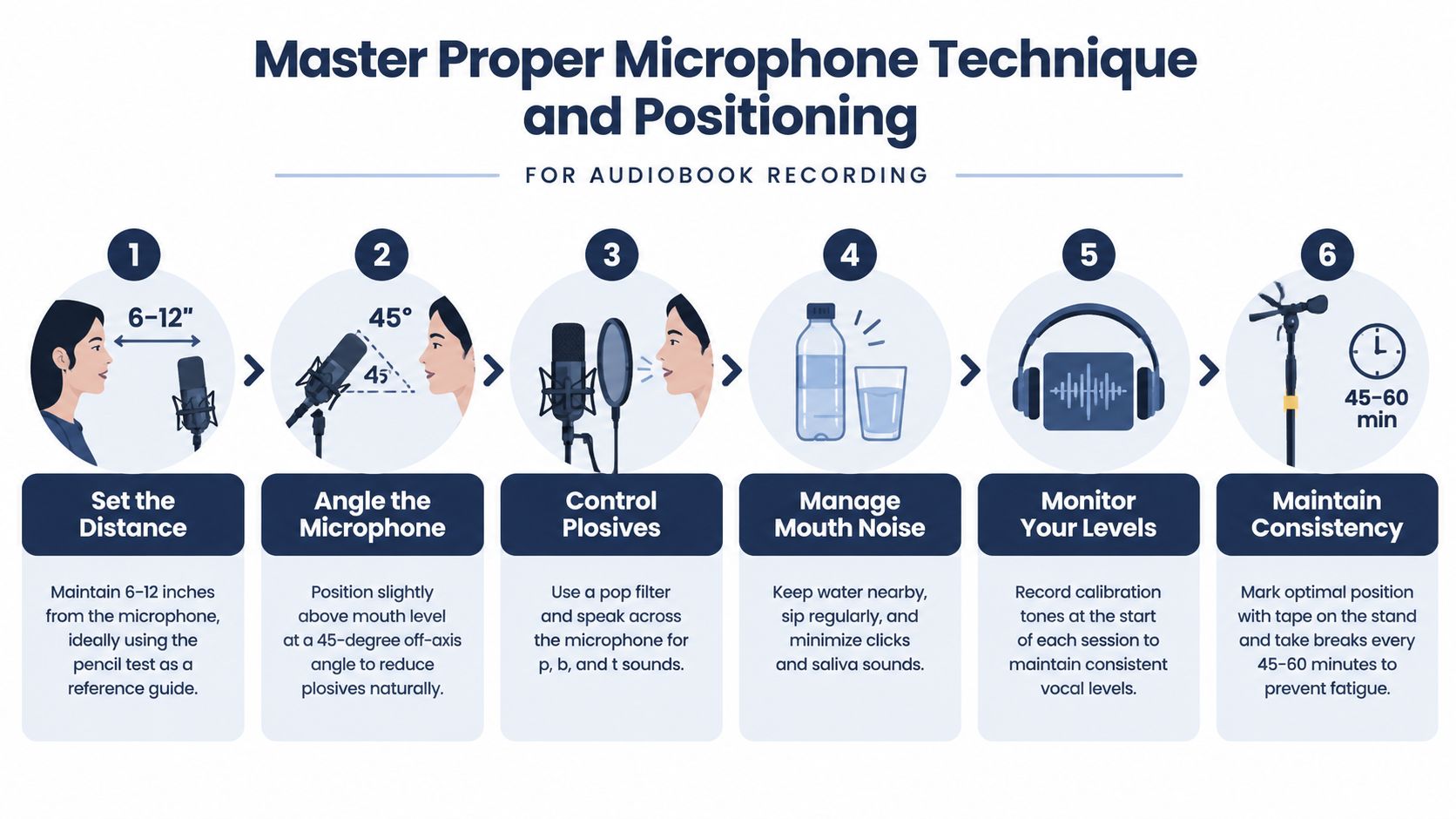
Start with a pop filter between your mouth and the microphone. Position the microphone slightly above mouth level and turn it a little off-axis so air from sounds such as “p,” “b,” and “k” doesn't hit the capsule directly. The exact distance depends on the microphone and your voice, but a stable position is more important than chasing a universal measurement.
Mark the position and protect the recording
Use tape on the floor or microphone stand to mark the stand's location. Mark the chair or standing position too. If you use a desk, place a small visual reference where your torso should remain. A pencil held horizontally between your mouth and the microphone can serve as a simple distance check during early practice, but rely on the recorded result rather than the tool itself.
Keep your head movement controlled. Turn your eyes to the page or screen instead of rotating your whole body toward the text. If a passage requires a louder delivery, increase energy through breath support and articulation before leaning into the microphone. Record a few test lines with plosive-heavy words and adjust your angle until the consonants stay clean.
- Control mouth noise: Keep water nearby and take small sips. Dryness, sticky saliva, and exaggerated lip movement can create more editing than a slightly imperfect performance.
- Capture room tone: Record a stretch of the silent room at the start of a session. That sound can help you identify changes in HVAC noise and fill small, carefully edited gaps.
- Use a repeatable level: Speak at the same distance and energy you expect to use in the chapter, then inspect the waveform before recording the full passage.
- Stop before technique collapses: A tired narrator changes posture, distance, breath control, and diction. Continuing may create more retakes than the time you think you're saving.
The best microphone technique is boring in the most useful sense. Your posture, distance, angle, pop filter, and input level should remain stable enough that the editor can work with the voice rather than repair every sentence.
3. Master Scripting and Preparation Techniques for Efficient Recording
The manuscript is your performance map. A cleanly formatted document with pronunciation notes and emotional cues prevents you from making decisions in the middle of a take. Without that preparation, narrators often pause to interpret a name, guess a character's intention, or restart a paragraph because the sentence looked different aloud than it did on the page.
Read each chapter aloud before recording it. Mark words that feel awkward, sentences that need a breath, and passages where punctuation doesn't match the intended meaning. For names, places, technical terms, and culturally specific language, create a pronunciation guide before the first session. If the author isn't narrating, provide the guide to the narrator early enough for questions to be resolved.
Turn the manuscript into a production document
Use a simple color system that you can apply consistently:
- Yellow for emphasis: Highlight words that carry an important turn in meaning or need deliberate stress.
- Pink for breathing: Mark natural breath points where the sentence can remain fluid without sounding rushed.
- Blue for pacing: Note passages that should feel slower, quicker, restrained, urgent, reflective, or conversational.
- Margin notes for emotion: Add concise cues such as quiet, angry, uncertain, amused, or grieving.
- Character notes at introduction: Record each character's vocal quality, accent, age impression, rhythm, and recurring speech patterns.
- Context notes: Explain the setting, time period, scene objective, and emotional significance when those details affect delivery.
Separate chapters visually with clear headings and generous spacing. Keep opening and closing credits in their own marked sections. If a difficult paragraph keeps causing errors, record a practice version, listen back, and revise the performance note before attempting the final take.
A style sheet prevents drift across recording days. It should include every character name, place name, invented term, abbreviation, preferred pronunciation, and voice decision. Authors should also state any pronunciation preferences and relevant cultural context rather than expecting a narrator to infer them.
For a useful perspective on room preparation, test recording, and author-led production, review this audiobook recording guide. Its emphasis on recording settings, room tone, and export discipline addresses the gap between a recording that sounds acceptable in isolation and one that can move through a delivery pipeline without rework.
4. Develop and Maintain Consistent Narration Style and Pacing
A listener may forgive a small variation in room tone. They're less likely to accept a character who sounds like a different person halfway through the story or a narrator whose energy changes sharply between sessions. Consistency doesn't mean every line should have the same intensity. It means the choices feel intentional and remain recognizable.
Create a character voice guide before recording the first chapter. Note pitch range, resonance, accent, rhythm, vocabulary, vocal tension, and the emotional limits of each voice. Avoid making every character radically different if those choices strain your throat or become difficult to reproduce. Distinctive rhythm and attitude can separate characters more sustainably than extreme pitch changes.
Pace the meaning, not just the words
Read full paragraphs aloud during preparation. Sentence-by-sentence practice can produce technically accurate delivery that still sounds fragmented. Paragraph-level reading reveals where the thought turns, where a listener needs space, and whether the emotional build is working.
Listen to the final minutes of the previous session before beginning a new one. Use that playback to match energy, vocal placement, and character choices. Record a brief test passage at the start of each session, then compare it with the previous material before continuing. If the voice sounds noticeably lower, brighter, faster, or more fatigued, adjust the session rather than hoping editing will solve it.
Mark changes in pace directly in the manuscript. A tense action sequence may need forward momentum, while an explanation or emotional reflection may need room. Don't accelerate just because you want to finish. Rushed narration forces listeners to work harder, and a slow delivery without purpose can flatten the story.
Narration is a marathon, not a sprint. Protect the voice and the listener's attention at the same time.
Take regular breaks before vocal fatigue changes your technique. The practical threshold varies by narrator, but a session should end when diction, breath, and emotional control begin to deteriorate, not when the schedule looks convenient. A professional narrator may also divide work at natural chapter or scene breaks so the performance remains easier to match and proof.
5. Implement Proper Editing and Audio Enhancement Workflows
Editing should reveal the performance, not replace it. Start by duplicating the raw session and keep the original untouched. Work non-destructively when your software allows it, label versions clearly, and save each chapter in a predictable folder structure.
The first pass should address obvious mistakes, false starts, long unintended pauses, distracting mouth sounds, and technical interruptions. Use a clear marker when you make a mistake during recording, such as a short spoken cue or a distinct sound. That marker makes the waveform easier to scan, but remove it completely during editing and check the surrounding sentence afterward.
Apply processing conservatively
Aggressive noise reduction can create metallic artifacts and make a voice sound processed. Capture a clean room-tone sample, use a gentle reduction setting, and compare the treated audio with the original. If the noise is inconsistent, such as a passing vehicle or a chair bump, manual editing may sound more natural than applying heavy processing to the entire file.
Equalization should solve a specific problem. Reduce muddiness if the voice sounds congested, control harshness if consonants are abrasive, and avoid boosting frequencies just because a preset recommends it. Compression can smooth ordinary level changes, but too much compression removes natural dynamics and brings breaths and room noise forward.
A practical editing sequence looks like this:
- Clean obvious defects: Remove false starts, accidental noises, clipped words, and disruptive handling sounds.
- Preserve natural breaths: Reduce only breaths that pull attention away from the performance. Removing every breath can make narration feel artificial.
- Check transitions: Listen across every edit for changes in room tone, resonance, timing, or vocal position.
- Measure rather than guess: Use meters for RMS, peaks, and other delivery requirements instead of relying only on headphone volume.
- Review multiple systems: Check the chapter on headphones, phone speakers, car speakers, or another everyday playback system.
ACX requires audiobook masters to sit between -23 dB and -18 dB RMS, with peaks no higher than -3 dB, and files must be delivered as at least 192 kbps constant-bit-rate MP3 files. ACX also requires the audiobook to be entirely mono or entirely stereo, rather than a mixture, and recommends room-treatment materials such as curtains, rugs, and foam to reduce reflections around the microphone. Verify your workflow against the ACX technical delivery requirements.
If you're comparing software before building the editing stage, review audiobook recording software options. For a related approach to cleaning spoken source material, this spoken lab notes cleanup guide offers useful thinking about preserving intelligibility while removing distractions.
6. Optimize File Format, Bitrate, and Technical Specifications for Distribution
A polished chapter can still fail delivery when its export settings do not match the distributor's rules. Set those requirements before recording, because the platform, distribution route, and number of master versions will shape your workflow. Keep the approved audio separate from the delivery exports.
Record in an appropriate uncompressed format, then create compressed files only after editing and quality control. A common production target is 44.1 kHz with 16-bit or 24-bit capture, but confirm the selected platform's current instructions before the first session. Recording quality and final MP3 settings serve different purposes. Compression belongs at delivery.
Build a folder system that another person can follow without explanation. Separate raw sessions, edited masters, approved exports, artwork, metadata, and correction versions. Use consistent names containing the author surname, book title, chapter number, and chapter title. A revision such as “final2” quickly becomes ambiguous, so use a clear version convention instead.
Before export, run this specification check:
- File type: Select the format requested by the distributor. Do not assume that one service's settings apply everywhere.
- Bitrate: For an ACX route, use at least 192 kbps constant-bit-rate MP3. Keep the required bitrate and constant-bit-rate setting intact when exporting.
- Channel format: Keep the audiobook entirely mono or entirely stereo when the platform requires consistency. Do not combine channel formats across chapters.
- Metadata: Enter the author, narrator, title, chapter information, and other requested fields accurately.
- Playback: Open every exported file, checking its beginning, middle, and ending rather than testing only the first chapter.
- Platform rules: Download the current technical instructions for each distributor before submission. Requirements can change.
A file that plays on your computer is not automatically ready to publish. Test exports on a phone, ordinary speaker, or car system when possible. These checks can expose abrupt starts, overly quiet passages, excessive bass, missing chapter audio, or corruption that studio headphones may not reveal.
Keep the approved master untouched. Generate platform-specific copies from it, then record the export settings and approval status in the delivery folder. If your project needs a format distinction during planning, review this guide to unabridged audiobook production. That separation makes revisions safer and gives a client, editor, or distributor a file set they can verify quickly.
7. Conduct Thorough Quality Control and Proofing Before Distribution
Quality control deserves its own pass after editing. The narrator often hears the intended sentence instead of the recorded one, especially after many retakes. A fresh listener can catch skipped words, repeated lines, incorrect pronunciations, and abrupt edits that have become familiar to the person who performed the chapter.
Keep the manuscript open beside the exported audio. Mark chapter titles, opening announcements, names, numbers, dates, quotations, repeated phrases, and every re-recorded passage. Record each issue in a correction log with the chapter, approximate location, problem, priority, and required action. For a DIY project, this log turns vague concerns into a repair list an editor can follow.
Give each review pass one job
Do not judge content, performance, and file integrity during one unfocused listen. Use separate passes:
- Content pass: Confirm that every word appears in the correct order, with no substitutions, skipped paragraphs, or missing lines.
- Performance pass: Check pacing, emotional intent, character distinction, pronunciation, and continuity with nearby chapters.
- Technical pass: Listen for noise, clipping, clicks, edit seams, unnatural silence, room-tone changes, and problems at file starts or endings.
- Delivery pass: Verify file names, chapter order, metadata, format, channel consistency, and playback of the exported files.
Listen at normal speed first. A faster check can reveal repeated words, awkward edits, and pacing problems that may disappear during a slower technical review, but it cannot replace normal-speed listening. Review one chapter at a time and note the exact repair needed. Short, focused sessions reduce the chance that a long book becomes background noise.
Commercial audiobook research shows that listeners place high value on audio quality. The Accessible Commercial Audiobook Research Project found that 94% of respondents rated audio quality as important or very important, including 66% who rated it very important. Clean narration, stable volume, and a quiet background therefore affect the listening experience, not just the studio finish. Read the Accessible Commercial Audiobook Research Project report for its research context.
Have someone other than the narrator review the approved exports. Apply the corrections, export only the affected files, and repeat the final playback check. Verify the delivery files themselves. Repairing the source session does not prove that the corrected audio reached the files prepared for distribution.
8. Leverage Professional Narrators vs. Author Narration Decision
A memoir author may sound most convincing reading personal experience, while a character-heavy novel can demand vocal control that is difficult to sustain alone. Make the narrator decision before recording, because it affects manuscript preparation, session planning, editing, and delivery. Author narration suits memoir, personal essays, and nonfiction grounded in lived experience. A professional narrator may be more efficient for commercial fiction, demanding accents, multiple characters, or projects where consistent performance matters more than the author's direct delivery.
Run a short audition before committing to the full manuscript. Choose a representative passage with narration, dialogue, pronunciation challenges, and emotional shifts. Record it yourself, then compare it with samples from professional narrators. Listen for diction, stamina, emotional range, character separation, pacing, and whether the voice remains natural without strain. A strong speaking voice does not by itself prove that someone can carry a long-form performance.
Use the audition as a production test, not only a talent comparison. Mark difficult names and technical terms, rehearse the passage, record it under the planned room and microphone setup, and review the retakes required. If the author can deliver the passage consistently and has time for the full workflow, author narration may be practical. If the test exposes vocal fatigue, uneven pacing, or repeated character confusion, hire support before those problems spread across the book.
Compare the real investment
A microphone is only one part of DIY narration. Budget for room preparation, recording time, retakes, editing, technical training, proofing, file management, and the time removed from writing or marketing. ACX production guidance indicates that new narrators may need 5 to 7 hours for each finished hour of audio, before broader editing and quality-control work. Estimate from that benchmark, then include time for corrections and delivery checks rather than using the manuscript's reading time alone.
Professional support can save time in specific situations:
- Many characters: A trained narrator can establish repeatable character choices with less experimentation.
- Technical manuscripts: Pronunciation, specialized terminology, and complex structure benefit from experienced preparation and production.
- Uncontrolled rooms: A managed studio or audiobook production service may produce cleaner recordings than repairing persistent household noise.
- Firm deadlines: Outsourcing narration, editing, or quality control reduces the number of production skills one person must learn at once.
- Limited author availability: Personal authenticity remains valuable, but it does not require the author to become a recording engineer.
The audiobook market continues to expand, while human narration remains commercially important. Industry coverage reports that digital audiobooks represented 99% of U.S. audiobook revenue in 2025, with 10% year-over-year growth, while AI-narrated audiobooks accounted for 0.03% of sales in 2025. The same coverage reports that active audiobook titles exceeded 750,000 in 2025, up 43% from the prior year. Consult the Audio Publishers Association research and FAQ material for context on AI narration, human performance, and competition.
Choose automation for an appropriate use case. Choose a skilled human narrator when interpretation and sustained performance carry the project. The practical decision is the workflow that produces controlled, listenable files without underestimating the labor involved.
8-Point Audiobook Recording Comparison
| Item | Complexity 🔄 | Resources ⚡ | Expected Outcomes 📊 (Quality ⭐) | Ideal Use Cases 💡 | Key Advantages ⭐ |
|---|---|---|---|---|---|
| Invest in Quality Recording Equipment and Acoustics | High 🔄, hardware + room treatment setup | High ⚡, $500–$3,000+, dedicated space, maintenance | Professional, distribution-ready audio; high acceptance. ⭐⭐⭐⭐ 📊 | Authors aiming for broadcast-quality audiobooks; ongoing production | Consistent sound; fewer re-records; reduced editing time |
| Master Proper Microphone Technique and Positioning | Medium 🔄, practice and technique refinement | Low–Medium ⚡, time, basic accessories (pop filter, stand) | Stable levels and fewer artifacts; cleaner raw tracks. ⭐⭐⭐ 📊 | Home studios; multi-session recordings; solo narrators | Reduces plosives/mouth noise; saves editing time |
| Master Scripting and Preparation Techniques for Efficient Recording | Medium 🔄, extensive annotation and rehearsal | Low–Medium ⚡, 10–20+ hours prep, annotation tools | Fewer retakes, consistent character delivery, faster sessions. ⭐⭐⭐⭐ 📊 | Complex narratives, multi-character books, long projects | Speeds recording; reduces revisions; preserves consistency |
| Develop and Maintain Consistent Narration Style and Pacing | High 🔄, sustained discipline across sessions | Medium ⚡, coaching, reference recordings, breaks | Immersive, engaging performance; high listener retention. ⭐⭐⭐⭐ 📊 | Fiction series, long-form audiobooks, character-driven works | Improves engagement; clear character differentiation |
| Implement Proper Editing and Audio Enhancement Workflows | High 🔄, technical post-production skills | High ⚡, software (RX, Audition), time (3–5 hrs per finished hour) | Broadcast-quality, restored audio; platform-compliant. ⭐⭐⭐⭐ 📊 | Final production polish; rescuing imperfect recordings | Corrects mistakes without re-recording; ensures consistency |
| Optimize File Format, Bitrate, and Technical Specifications for Distribution | Medium 🔄, platform-specific rules and conversions | Low–Medium ⚡, encoding tools, metadata editors | Accepted on platforms; balanced quality and file size. ⭐⭐⭐ 📊 | Multi-platform distribution; final export and submission | Prevents rejections; improves discoverability and compatibility |
| Conduct Thorough Quality Control and Proofing Before Distribution | High 🔄, multi-pass listening and validation | High ⚡, 40–100+ hrs, multiple reviewers | Fewer post-release issues; higher listener satisfaction. ⭐⭐⭐⭐ 📊 | All commercial releases; high-stakes or long audiobooks | Catches errors pre-release; ensures author approval |
| Leverage Professional Narrators vs. Author Narration Decision | Medium 🔄, casting or self-narration workflow | Variable ⚡, low (author) to high (pro narrator fees $3k–$15k+) | Professional narration: polished, commercial appeal ⭐⭐⭐⭐; Author narration: authentic, lower cost ⭐⭐⭐ 📊 | Memoirs/personal essays (author); commercial fiction (pro) | Flexibility: cost vs. quality trade-off; hybrid options possible |
Turn Your Recording Plan Into a Release-Ready Audiobook
A reliable audiobook workflow begins before the microphone is connected. Prepare the manuscript as a performance document, not just a reading copy. Mark pronunciation, breathing, emphasis, pacing, emotional intent, character details, and scene context. Separate chapters clearly, resolve uncertain names early, and create a style sheet that you can consult throughout the project.
Next, choose the narrator and recording environment carefully. If you're narrating, record a representative test and listen for diction, stamina, room noise, plosives, mouth sounds, and emotional range. If you're hiring a narrator, compare samples against the book's tone and audience rather than choosing only the most impressive voice in isolation. Make sure the room can remain quiet and consistent, then position the microphone, pop filter, headphones, and interface so the setup can be recreated for every session.
Record a controlled test before beginning the full manuscript. Confirm that the room is quiet, the input is clean, the voice is comfortable, and the file opens correctly after export. Keep the microphone position fixed, mark the stand and narrator position, capture room tone, and use the same recording settings across sessions. A short test can expose a fan, cable, reflection, or level problem while the project is still easy to change.
During production, work in manageable sessions and stop before fatigue damages the performance. Read the upcoming passage aloud, review difficult words, listen to the previous session, and record a short consistency check. If you make a mistake, pause and restart cleanly. Keep raw recordings untouched, use clear version names, and back up each session before editing.
Edit conservatively. Remove distractions and errors, but preserve natural breaths, appropriate dynamics, and the character of the voice. Use measured noise reduction and compression, verify RMS and peak targets, check channel consistency, and export the format required by your distributor. A polished audiobook doesn't sound artificially processed. It sounds clear, stable, and easy to follow.
Treat quality control as an independent production gate. Compare every chapter against the manuscript, check names and pronunciations, listen for skipped or repeated lines, inspect edit points, review starts and endings, and test the approved exports on ordinary listening devices. Have another person listen when possible, because a fresh reviewer catches errors that become invisible to the person who recorded them.
Finally, make a realistic decision about professional help. DIY production can work when the author has a controlled room, enough time to learn the tools, and the vocal ability to sustain the book. Professional narration or managed post-production can be more efficient when the manuscript is long, technically demanding, character-heavy, or tied to a firm release schedule. BarkerBooks offers publishing support that can include audiobook recording and related production guidance, so authors who want help managing the recording, editing, or quality-control stages can explore that option alongside their wider publishing plan.
Don't press record until the workflow is ready. Prepare the manuscript, test the room, confirm the settings, record a short sample, and define the approval checks first. That preparation turns audiobook recording tips into repeatable production decisions instead of emergency fixes after the work is already complete.
BarkerBooks can help authors plan audiobook recording, connect production decisions with publishing, and manage services such as narration, editing, and quality control. Visit BarkerBooks to discuss a production path that fits your manuscript, timeline, and level of hands-on involvement.